Run Sample Applications
The RZ/G3E NPU Support prebuilt software package installs several applications to the rootfs that can be used to test Ethos-U and model functionality.
There are 2 types of applications provided:
- Example Image Classification Use Case (MobileNet V2)
- Generic Model Evaluation
All applications are installed under /usr/bin, so navigate to this
directory.
Example Image Classification Use Case
Overview:
- Runs image classification on a local image file using MobileNet V2.
- Inference is executed on the NPU only.
- There are 2 variants of this application that demonstrates the
C++ library and Python library.
- C++: image-classification
- Python: image-classification.py
- C++ application supports HDMI output and console-only output.
- Python application only supports console-only output.
- Sample image files have been provided under
/usr/share/image-classification/images/.
Run C++ Application
To run the application, execute the following command.
This will output the inference results to the HDMI display as seen in the image below.
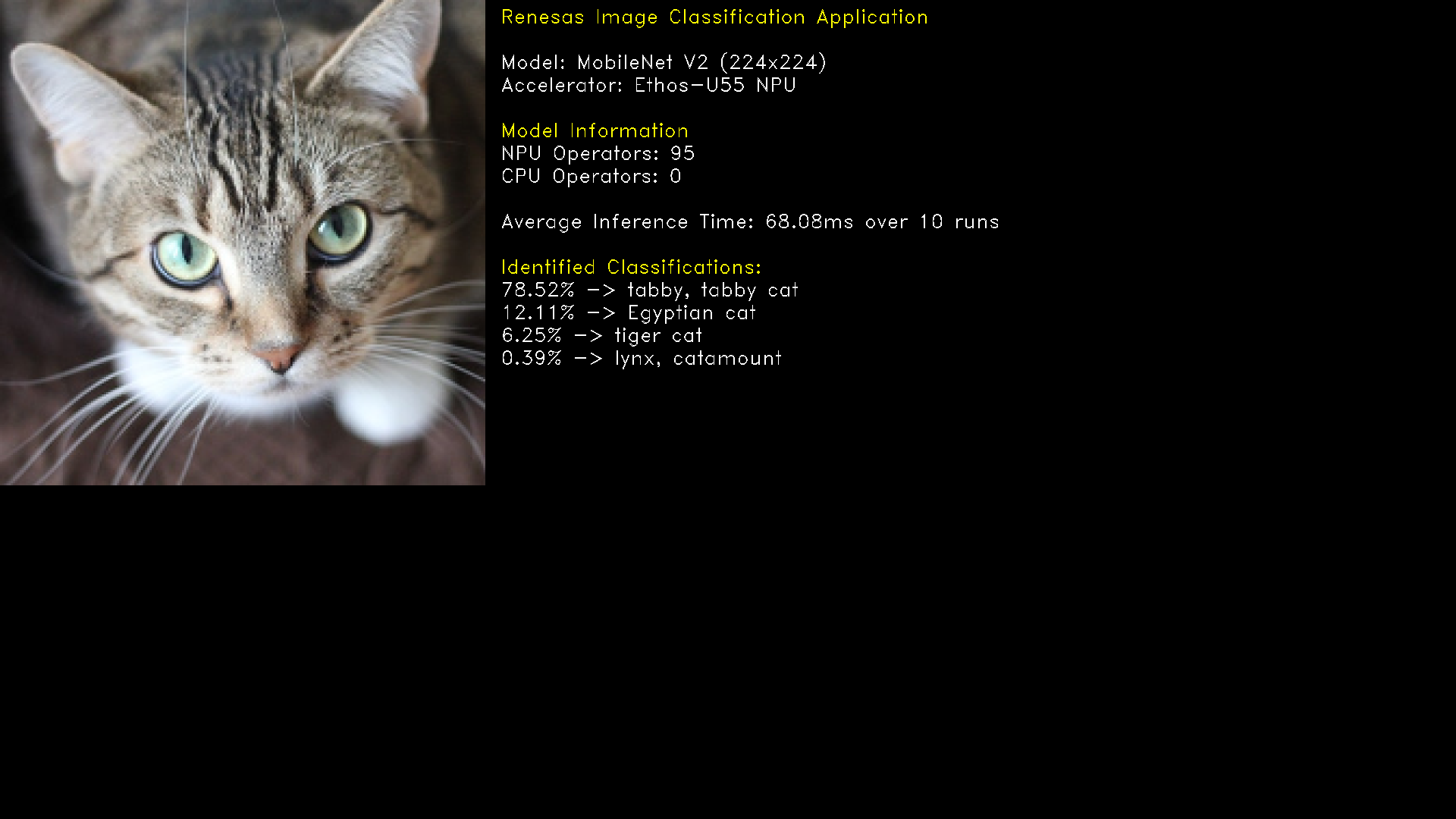
The serial console will contain the inference time and a message about how to exit the application:
Inference Run #1, inference time: 68.963715ms
...
Average Inference time: 68.08ms over 10 runs

Displaying top Image Classification results....
Please press the ENTER key to close the application
Once the ENTER key is selected on the serial console window, the display window and application will close.
To run the application, execute the following command.
This will print a log to the console containing the inference time and image classification results.
Run Python Application
To run the application, execute the following command.
This will print a log to the console containing the inference time and image classification results.
2026-03-30 17:24:26,139 INFO -  Loading deployment from Mera project '/usr/share/models/mobilenet_v2/mobilenet_v2_1.0_224_INT8' ...
2026-03-30 17:24:26,246 INFO -  Inference Run #1, inference time: 69.168458ms
...
2026-03-30 17:24:26,868 INFO -  Average Inference time: 68.86ms over 10 runs
2026-03-30 17:24:26,869 INFO -  Printing top 5 Image Classification results...
Top (0) 282 (76.95%) -> tabby, tabby cat
Top (1) 286 (14.06%) -> Egyptian cat
Top (2) 283 (5.47%) -> tiger cat
Top (3) 288 (0.39%) -> lynx, catamount
Top (4) 314 (0.0%) -> walking stick, walkingstick, stick insect
Command-Line Parameters
The table below details the command-line parameters for the Image Classification applications.
| Parameter | Details | Supported Application | Default |
|---|---|---|---|
-c--console |
Prints results to the console only, no display. (Flag) | image-classification |
False |
-i--image |
Path to image file to run inference on. | image-classificationimage-classification.py |
cat.bmp |
-n--number |
Number of times to run inference. | image-classificationimage-classification.py |
10 |

Generic Model Evaluation
Overview:
- Validates and benchmarks models on the RZ/G3E.
- The application allows for output directory generated during model compilation to be used as input, where inference is run on each model defined in the auto-generated configuration file.
- There are 2 variants of this application that demonstrates the
C++ library and Python library.
- C++: model-executor
- Python: model-executor.py
- There is no difference in the features between both applications.
- A sample model (MobileNet V2) has been provided under
/usr/share/models/mobilenet_v2.
Run Application
To run the application, execute the following command.
This will print a log to the console containing the inference time per run and an average inference time.
Model being executed: mobilenet_v2_1.0_224_INT8
[2026-03-30 16:00:12.271] [console] [info] MERA 2.0 Runtime
Inference Run #1, inference time: 68.420380ms
Inference Run #2, inference time: 67.915627ms
Inference Run #3, inference time: 67.977715ms
Inference Run #4, inference time: 67.977997ms
Inference Run #5, inference time: 67.980003ms
Inference Run #6, inference time: 67.982040ms
Inference Run #7, inference time: 67.978661ms
Inference Run #8, inference time: 67.976456ms
Inference Run #9, inference time: 67.978920ms
Inference Run #10, inference time: 67.984169ms
------------------------------
           Results
Model: mobilenet_v2_1.0_224_INT8
Average inference time: 68.02ms over 10 runs
------------------------------
Successfully saved output data for tensor #1 to /usr/share/models/mobilenet_v2/mobilenet_v2_1.0_224_INT8/output_0.bin
To run the application, execute the following command.
This will print a log to the console containing the inference time per run and an average inference time.
2026-03-30 16:06:42,259 INFO -  Model being executed: mobilenet_v2_1.0_224_INT8
2026-03-30 16:06:42,260 INFO -  Loading deployment from Mera project '/usr/share/models/mobilenet_v2/mobilenet_v2_1.0_224_INT8' ...
2026-03-30 16:06:42,415 INFO -  Inference Run #1, inference time: 68.907666ms
2026-03-30 16:06:42,485 INFO -  Inference Run #2, inference time: 69.496042ms
2026-03-30 16:06:42,554 INFO -  Inference Run #3, inference time: 68.753791ms
2026-03-30 16:06:42,623 INFO -  Inference Run #4, inference time: 68.781ms
2026-03-30 16:06:42,692 INFO -  Inference Run #5, inference time: 68.798083ms
2026-03-30 16:06:42,761 INFO -  Inference Run #6, inference time: 68.798ms
2026-03-30 16:06:42,830 INFO -  Inference Run #7, inference time: 68.793625ms
2026-03-30 16:06:42,899 INFO -  Inference Run #8, inference time: 68.802042ms
2026-03-30 16:06:42,968 INFO -  Inference Run #9, inference time: 68.786625ms
2026-03-30 16:06:43,037 INFO -  Inference Run #10, inference time: 68.790667ms
2026-03-30 16:06:43,037 INFO -  ------------------------------
2026-03-30 16:06:43,037 INFO -             Results
2026-03-30 16:06:43,037 INFO -  Model: mobilenet_v2_1.0_224_INT8
2026-03-30 16:06:43,037 INFO -  Average inference time: 68.87ms over 10 runs
2026-03-30 16:06:43,038 INFO -  ------------------------------
2026-03-30 16:06:43,039 INFO -  Successfully saved output data for tensor #1 to /usr/share/models/mobilenet_v2/mobilenet_v2_1.0_224_INT8/mobilenet_v2_1.0_224_INT8_output_0.bin
Command-Line Parameters
Both variants of the Model Executor application support the command-line parameters detailed below.
| Parameter | Details | Default |
|---|---|---|
-e--executor_config_file |
Path to file containing information about models to run inference with. | /usr/share/models/mobilenet_v2/config.yaml |
-n--number |
Number of times to run inference. | 10 |