Build Procedure
Extract the r01an7861ej0300-rzg3e-ethosu.zip source package and
prepare the rz-ethos-u directory.
unzip r01an7861ej0300-rzg3e-ethosu.zip -d r01an7861ej0300-rzg3e-ethosu
cd r01an7861ej0300-rzg3e-ethosu/
unzip Linux_Software_Package.zip -d Linux_Software_Package
cd Linux_Software_Package/
unzip rz-ethos-u-v3.0.zip -d rz-ethos-u
cd rz-ethos-u/
-
In the project directory, load the Kas Menu.
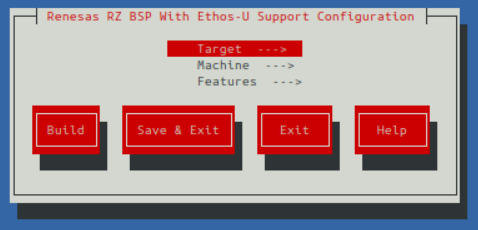
Kas Menu Screen -
Select the build configuration.
- Using the (↑/↓) arrow keys, navigate between the
Target,MachineandFeaturesoptions. - The spacebar/enter buttons can be used to select an option.
- To switch and control the bottom red options, either use the (←/→) arrow keys or the tab key.
- Using the (↑/↓) arrow keys, navigate between the
-
Once the configuration has been selected, the build can be kicked off immediately by selecting the
Buildoption. -
Or the configuration can be saved using the
Save & Exitoption.
If the configuration is saved, there are 2 ways to start a build using the generated configuration.
-
Interactive build: Kas opens a shell within its build environment, already configured to use bitbake.
-
Non-interactive build: Immediately starts the build.
The following Kas configuration fragments are supplied in the rz-ethos-u project.
| Configuration File | Purpose |
|---|---|
kas/base.yml |
Base configuration used by the project. |
kas/images/core-image-minimal.yml |
Configuration for building core-image-minimal. |
kas/images/core-image-weston.yml |
Configuration for building core-image-weston. |
kas/machines/smarc-rzg3e.yml |
Configuration for building smarc-rzg3e. |
kas/features/codecs.yml |
Enables H.264 and H.265 video codec library support. |
kas/features/graphics.yml |
Enables graphics library support. |
To build image:
To build image: