Tuning Inference Timeout
Overview
When using products with part numbers that include #AC0 or #BC0, the Ethos-U55 NPU may get stuck during inference. A timeout mechanism has been added to prevent the firmware becoming unresponsive. When the timeout is reached, the system will reset the NPU, cancel the current inference, and return a failed status to Linux.
The default timeout is 500 ms.
This value should be modified when using a model that takes longer than 500 ms for a single pure inference - this is the time for executing inference on the Ethos-U55 NPU only and not the inference time recorded in Linux.
Environment Setup
Note
The procedure documented in this page are done in a Windows environment. If using a different OS environment to run e2 studio, the appearance may look slightly different from the screenshots, but the steps still apply.
-
Download
e2studioinstaller on the Host PC from Renesas RZ FSP GitHub releases page. -
After opening the page, locate the installer named
setup_rzfsp_v4_1_0_e2s_*in the Assets section.- Windows: file ending in
.exe. - Linux: file ending in
.run.
- Windows: file ending in
-
Once the installer has been downloaded, run the file on the Host PC.
- On the setup page, please select
GNU ARM Embedded 13.3-Rel1forGCC Toolchains && Utilities.
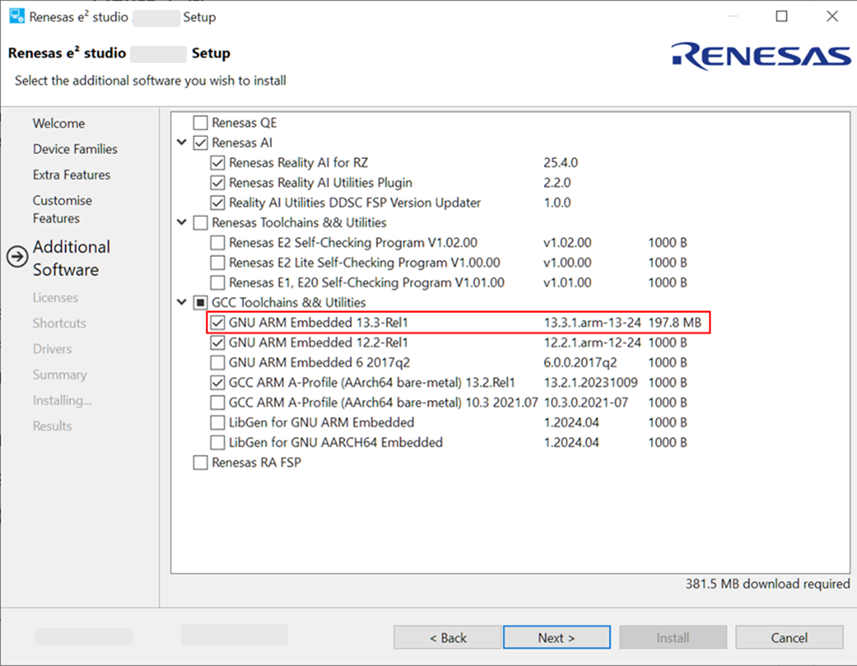
e2studio Setup Page - On the setup page, please select
-
Once the installation is completed, open e2studio.
-
Go to
File -> Import, then selectExisting Projects into Workspaceand clickNext.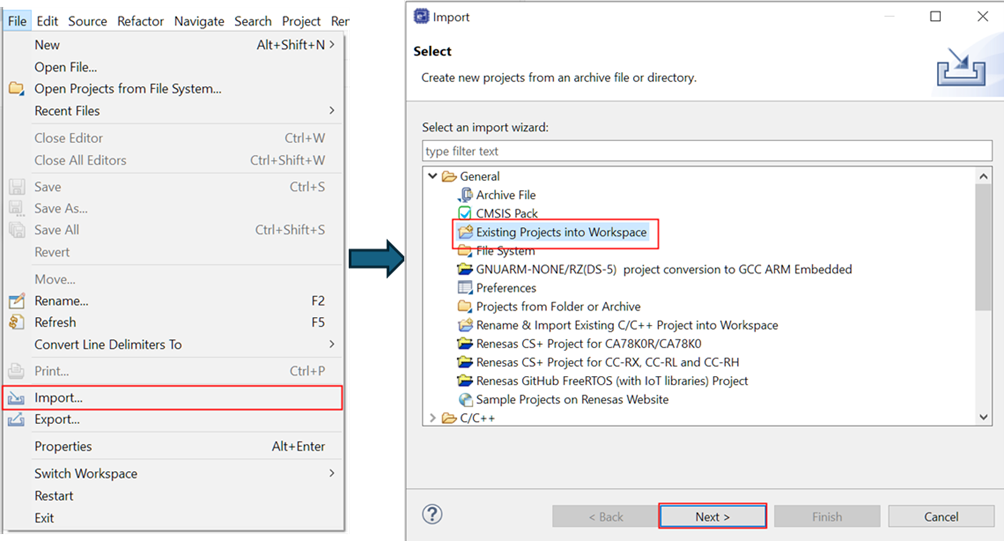
e2studio Import Page -
Check the
Select archive fileoption and enter the path toe2studio_rzg3e-ethos-u-firmware_cm33_project.zipfile ensuring the project is selected in theProjectswindow, then clickFinish.- The project should now be visible in the
Project Explorerlocated on the left side of the e2studio GUI.
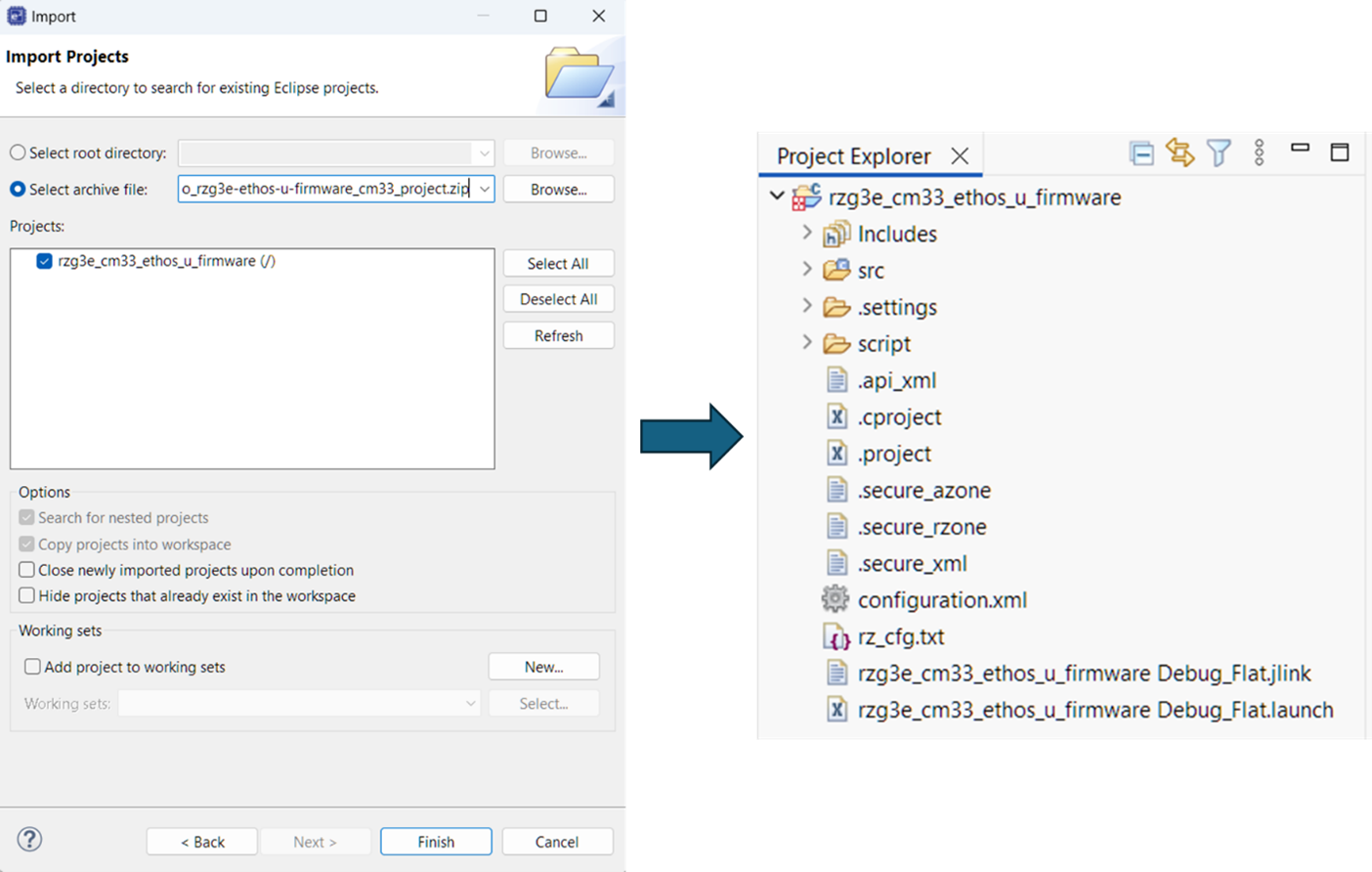
Importing Ethos-U Firmware Project In e2studio - The project should now be visible in the
Modifications To Firmware
-
On the top toolbar, select
Project -> C/C++ Project Settings. -
Under
C/C++ Build, click `Settings and modify theETHOSU_SEMAPHORE_WAIT_INFERENCEmacro to the preferred timeout value in milliseconds.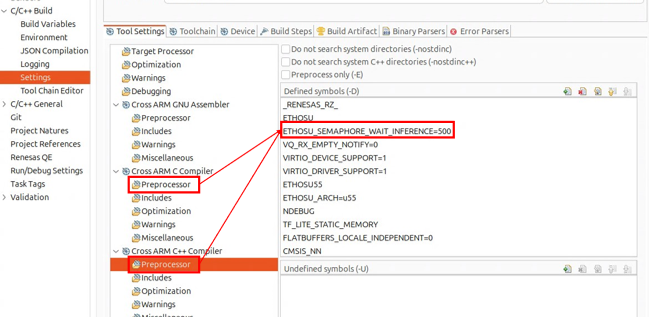
Changing Inference Timeout In e2studio
Build Procedure
-
Right-click the project in the
Project Explorerview and selectBuild Project. -
Once the build is completed, messages like the ones seen in the image below will appear in the
consolewindow.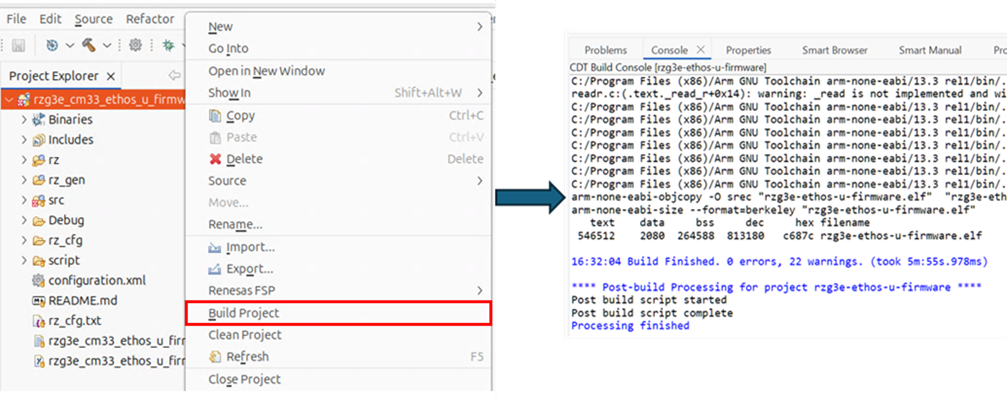
Build Firmware In e2studio -
The built firmware file
rzg3e-ethos-u-firmware.elfis generated in theDebugfolder.
Deploying Firmware
To deploy the built Ethos-U firmware onto the Linux rootfs, follow the steps below.
-
Power OFF the board if it is currently on.
-
Remove the SD Card from the board and connect it to Linux Host PC.
-
Copy the
rzg3e-ethos-u-firmware.elffile from Windows PC to the home directory on the Linux Host PC. -
On the Linux Host PC, navigate to the SD Card's root directory.
-
Copy the firmware file to the
/lib/firmware/directory on the SD Card. -
Make sure all of the data has been written to the SD Card.
-
Eject and remove the SD Card from Linux Host PC.
-
Connect the formatted SD Card to the uSD0 slot on the RZ/G3E.
-
Finally, power ON on the board to load the updated firmware.
-
Power OFF the board if it is currently on.
-
Copy the
rzg3e-ethos-u-firmware.elffile from Windows PC to the home directory on the Linux Host PC. -
On Linux Host PC, navigate to the TFTP or NFS root directory.
-
Copy the firmware file to the
/lib/firmwaredirectory with that path. -
Finally, power ON on the board to load the updated firmware.
Viewing Logs
Once the updated firmware is deployed, the logs can be viewed from the boards serial console using the following command:
This will print the logs stored in the remoteproc buffer. Example log after boot-up:
[0.000] Info: Starting the Ethos-U firmware...
[0.002] Info: Initializing NPU: base_address=0x49c80000, fast_memory=0x0, fast_memory_size=0, secure=1, privileged=1
[0.003] Info: Soft reset NPU
[0.005] Info: New NPU driver registered (handle: 0x0x80089248, NPU: 0x0x49c80000)
[0.005] Info: Initializing the Ethos-U remoteproc...
[0.007] Debug [remoteproc.cpp:init:124]:
[0.008] Debug [remoteproc.cpp:RProc:66]: setting up resource table
[0.010] Debug [remoteproc.cpp:RProc:67]: rsc_addr=0x80087B90, tableSize=233
[0.012] Debug [remoteproc.cpp:RProc:74]: setting up vdev
[0.013] Debug [remoteproc.cpp:RProc:81]: creating notify task
[0.015] Debug [remoteproc.cpp:notifyTask:110]: Starting message notify task
[0.016] Info: Initializing the Ethos-U Message Handler...
[0.018] Debug [remoteproc.cpp:notify:158]: