Prepare Necessary Environment
The necessary environment is broken into 2 components:
- Hardware
- Software
Necessary Hardware
Please prepare the following hardware equipment.
| Equipment | Details |
|---|---|
| RZ/G3E SMARC EVK | Evaluation Board Kit for RZ/G3E. Includes the microUSB to serial cable for serial communication. |
| USB Type-C Power Supply | 65W rated PD power supply to power the board. |
| USB Cable Type-C | 65W rated USB Type-C cable used to connect the power supply to the board. |
| HDMI Display | Used to display graphics of the board. |
| HDMI to microHDMI Cable | Used to connect the HDMI display to the board. |
| MicroSD Card | Must have over 8GB capacity. |
| SD Card Reader | Used for setting up microSD card. |
| Linux PC (Ubuntu) | Optional: Used for setting up microSD card instead of a Windows PC. Recommended: Ubuntu 22.04 LTS (64 bit) |
| Windows PC | Optional: Used for setting up microSD card instead of a Linux PC. |
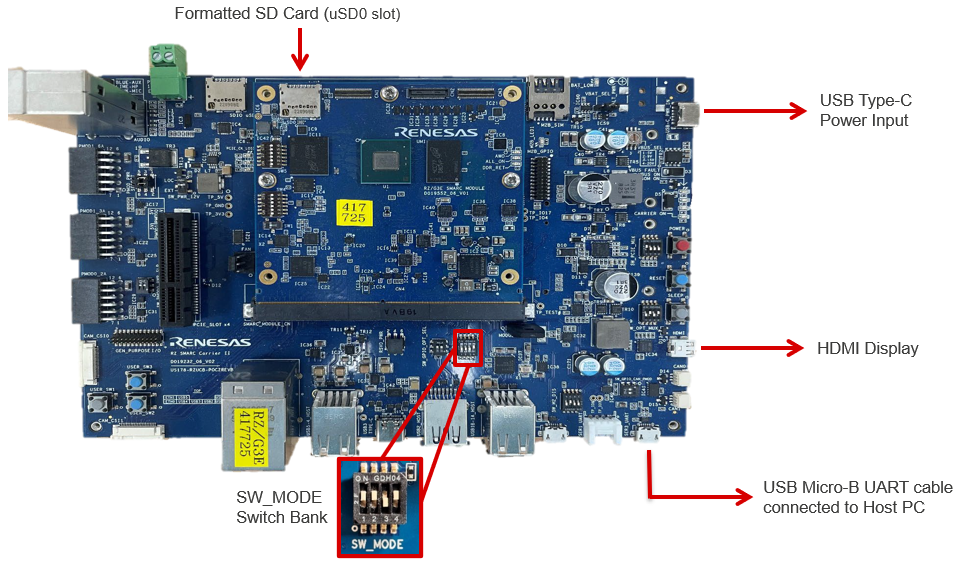
The diagram below illustrates the hardware connections to the RZ/G3E SMARC EVK.
Necessary Software
For SD Card flashing please install the following package on Ubuntu:
For SD Card flashing, please install balenaEtcher on Windows from https://etcher.balena.io.