This page explains how to build Linux with RZ/V2H AI SDK Source Code.
Supported version: RZ/V2H AI SDK v6.00
Introduction
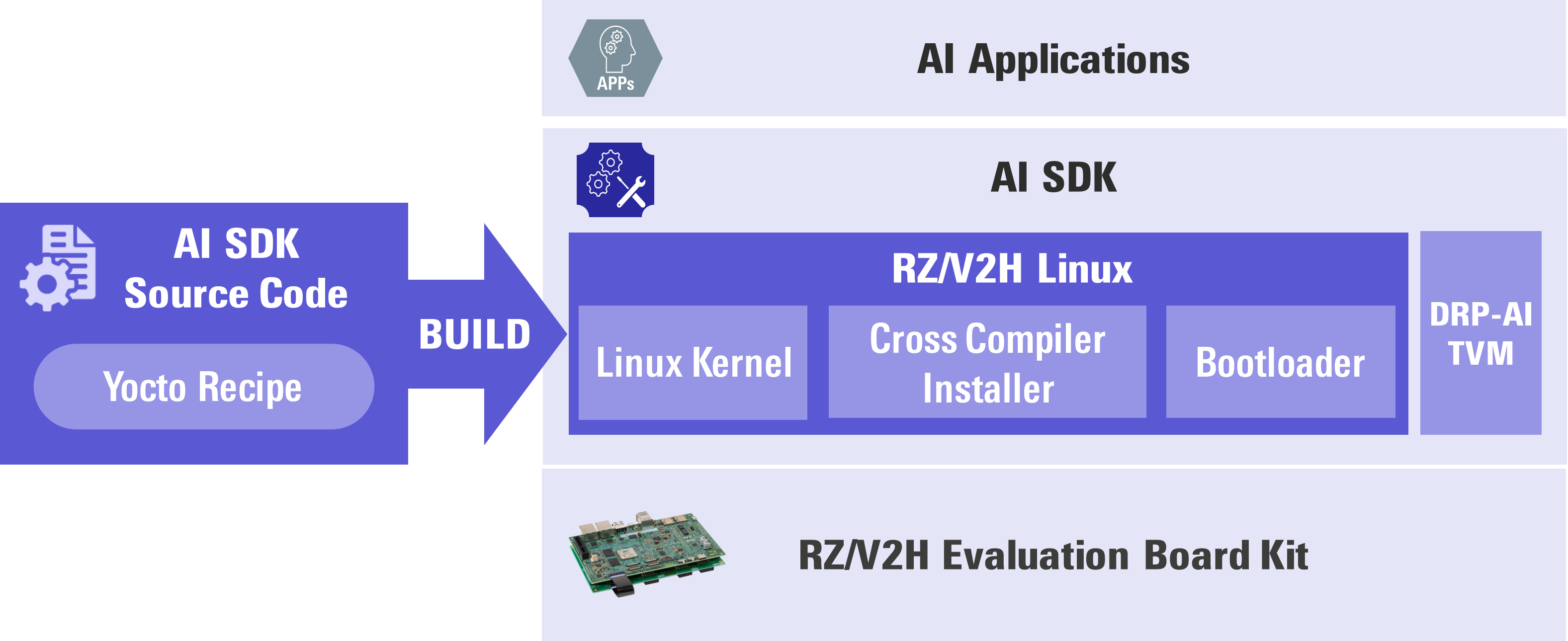
AI SDK is a quick and easy AI Application development environment.
It is specifically made for RZ/V2H Evaluation Board Kit with fixed Linux components.
(For more information, please refer to Getting Started and AI SDK.)
To modify Linux component, you need to build AI SDK from source code.
AI SDK Source Code can generate the same Linux environment as AI SDK.
This page explains how to build AI SDK Source Code.
After you have completed this page, you would be able to change the source code and customize Linux environment (i.e., memory map, additional OSS etc...).
To customize the Linux environment, please refer to RZ/V2H BSP Manual Set.
Requirement
Users have launched RZ/V2H Evaluation Board Kit according to Getting Started, which means they can run AI Application on the board.
To build Yocto Linux, the below equipment should be prepared.
Equipment
Details
Linux PC
Approximately 200GB free space is necessary.
OS
Ubuntu 22.04 LTS
64bit OS must be used.
Now you are ready to build your Linux development environment.
Let's get started!!
Step 1: Obtain RZ/V2H AI SDK Source Code
Download the RZ/V2H AI SDK Source Code from the link below.
AI SDK Source Code (RTK0EF0180F*_linux-src.zip) contains following files:
File name
Description
README.txt
README file.
rzv2h_ai-sdk_yocto_recipe_v*.tar.gz
Yocto recipe.
Yocto recipes are text files that contains necessary information to build Yocto Linux.
oss_pkg_rzv_v*.7z
OSS package.
OSS package is a set of Open Source Software source code used when building the Yocto Linux.
AI SDK Source Code provides this file to reproduce the same Linux environment provided in RZ/V2H AI SDK.
Step 2: Extract RZ/V2H AI SDK Source Code
This step explains how to extract RZ/V2H AI SDK Source Code zip file.
On your Linux PC, check you have already registered the environment variable WORK with the below command.
printenv WORK
If the above command prints followings, proceed next step.
Run the following commands and set the user name and email address before starting the build procedure.
It is needed to avoid errors when using git command to apply patches.
Run the following procedures to apply the patch file.
Optional: Apply patch file for bus setting.
If the system does not work properly, such as the stream stopping, when using DRP-AI TVM in combination with a camera connected via MIPI, USB or Ethernet, please apply the bus setting patch.
This patch sets the number of bytes per access to minimize the impact on operations between units when each RZ/V2H unit accesses the DDR.
Note
Applying this patch will improve system stability, but decrease the performance of single functions such as DRP-AI and Codec.
Please apply this patch with caution after thorough verification.
cp <Path to the file>/0001-system-setting-for-RZV2H-AI_SDK-v6.00.patch ${YOCTO_WORK}cd${YOCTO_WORK}
patch -p1 < 0001-system-setting-for-RZV2H-AI_SDK-v6.00.patch
Get e-CAM22_CURZH camera driver (MIPI) from e-con Systems.
The e-CAM22_CURZH camera driver (MIPI) used in AI SDK is not included in the RZ/V2H AI SDK Source Code. The required driver needs to be obtained through the following procedure.
To build the e-CAM22_CURZH camera driver (MIPI) for RZ/V2H Evaluation Board Kit, contact e-con Systems at this link to obtain the patch file below.
File name
Description
e-CAM22_CURZ*.patch
e-CAM22_CURZH camera driver (MIPI) Yocto patch file for RZ/V2H
Copy and apply the patch file.
cp <Path to the file>/e-CAM22_CURZ*.patch ${YOCTO_WORK}cd${YOCTO_WORK}
patch -p1-i e-CAM22_CURZ*.patch
Note
You can also use Arducam Technology's MIPI camera by installing its driver. Please refer to this link for the driver download and instructions.
For support and inquiries regarding this driver and Arducam Technology's MIPI camera, please contact Arducam Technology.
cp <Path to the file>/0001-linux-renesas-add-bug-fix-for-DMAC-driver-1.patch ${YOCTO_WORK}cd${YOCTO_WORK}/meta-renesas
patch -p1 < ${YOCTO_WORK}/0001-linux-renesas-add-bug-fix-for-DMAC-driver-1.patch
cp <Path to the file>/0002-fix-mmngr-issue-for-RZV2H-AI_SDK-v6.00.patch ${YOCTO_WORK}cd${YOCTO_WORK}
patch -p1 < ${YOCTO_WORK}/0002-fix-mmngr-issue-for-RZV2H-AI_SDK-v6.00.patch
cp <Path to the file>/0003-fix-opencva-issue-for-RZV2H-AI_SDK-v6.00.patch ${YOCTO_WORK}cd${YOCTO_WORK}
patch -p1 < ${YOCTO_WORK}/0003-fix-opencva-issue-for-RZV2H-AI_SDK-v6.00.patch
Check the working directory to confirm Yocto recipes content.
ls-1${YOCTO_WORK}
If the above command prints followings, Yocto recipes are extracted correctly.
Apply a patch file to add Tesseract Open Source OCR Engine for AI applications.
patch -p1 < ../patch/0001-tesseract.patch
Apply a patch file to add OpenMP for AI applications.
patch -p1 < ../patch/0002-openmp.patch
Run the following procedures to extract the OSS package.
Run the following commands to extract the OSS package to the ${YOCTO_WORK}/build directory.
cp${WORK}/src_setup/oss_pkg_rzv_*.7z ${YOCTO_WORK}
7z x ${YOCTO_WORK}/oss_pkg_rzv_*.7z -o${YOCTO_WORK}/build
Check the working directory to confirm the package contents.
ls-1${YOCTO_WORK}/build
If the above command prints followings, the package is extracted correctly.
conf
downloads
Run the following command to build the Linux kernel files.
(It takes a few hours to finish building depending on the user's host PC performance)
MACHINE=rzv2h-evk bitbake core-image-weston
All necessary files listed below will be generated by the build command and
they will be located in ${YOCTO_WORK}/build/tmp/deploy/images/rzv2h-evk directory.
A necessary file listed below will be generated by the build command and the cross compiler installer will be located in ${YOCTO_WORK}/build/tmp/deploy/sdk/rz-vlp-glibc-x86_64-core-image-weston-cortexa55-rzv2h-evk-toolchain-*.sh.