Appendix for RZ/T,N
How to boot from eMMC
In this section, the steps to boot from eMMC are described.
Writing Bootloader for eMMC Boot
For the boot operation, EXT_CSD register of eMMC need to be modified and two boot loader files need to be written to the target board. Modifying register address and value information are described in the following table.
After booting the Flash Programmer,Then, EMMCW command of Flash Programmer is used to write boot loader binary files. This command receives binary data from the serial port and writes the data to a specified address of the eMMC with information where the data should be loaded on the address of the main memory.
Then, set the SW2-1 and SW2-2 to ON to enable eMMC.
| SW2-1 | SW2-2 |
|---|---|
| ON | ON |
And change CN78 on the module as follow.
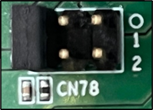
| CN78-5 | CN78-3 | CN78-1 |
|---|---|---|
| CLOSED | OPEN | OPEN |
| CLOSED | OPEN | OPEN |
| CN78-6 | CN78-4 | CN78-2 |
For example, this part describes how to modify EXT_CSD register and write boot loader files:
USB Download mode (Normal USB boot)
-- Load Program to RAM ---------------
-- Start Boot Program on RAM ---------
Flash Programmer V1.04 (RZT2H)(CR52)
> EMMCWECSD 0xb3 0x9
EXT_CSD[179] = 0x9
Write the bootloader file by using EMMCW command.
Send the data of bl2_bp_emmc-rzt2h-dev.srec from terminal software after the message send file is shown.
After successfully downloading the binary, messages like below are shown on the terminal.
Next, write another bootloader file by using EMMCW command again.
Send the data of fip-rzt2h-dev.srec from terminal software after the message send file is shown.
After successfully downloading the binary, messages like below are shown on the terminal.
Then modify EXT_CSD register by running EMMCWECSD and EMMCW commands.
After writing two loader files normally, turn off the power switch of the board.
Note
Address of
EXT_CSDregister of eMMC for eMMC bootAddress Value to write 0xB10x020xB30x08
Then, set the DSW5-1 and DSW5-2 to ON to enable eMMC.
| DSW5-1 | DSW5-2 |
|---|---|
| ON | ON |
And change JP23 on the module as follow.
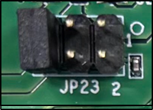
| JP23-5 | JP23-3 | JP23-1 |
|---|---|---|
| CLOSED | OPEN | OPEN |
| CLOSED | OPEN | OPEN |
| JP23-6 | JP23-4 | JP23-2 |
For example, this part describes how to modify EXT_CSD register and write boot loader files:
USB Download mode (Normal USB boot)
-- Load Program to RAM ---------------
-- Start Boot Program on RAM ---------
Flash Programmer V1.04 (RZT2H)(CR52)
> EMMCWECSD 0xb3 0x9
EXT_CSD[179] = 0x9
Write the bootloader file by using EMMCW command.
Send the data of bl2_bp_emmc-rzn2h-dev.srec from terminal software after the message send file is shown.
After successfully downloading the binary, messages like below are shown on the terminal.
Next, write another bootloader file by using EMMCW command again.
Send the data of fip-rzn2h-dev.srec from terminal software after the message send file is shown.
After successfully downloading the binary, messages like below are shown on the terminal.
Then modify EXT_CSD register by running EMMCWECSD and EMMCW commands.
After writing two loader files normally, turn off the power switch of the board.
Note
Address of
EXT_CSDregister of eMMC for eMMC bootAddress Value to write 0xB10x020xB30x08
Create a microSD card for writing Linux image to eMMC
Please create a microSD card (see Step 4: Deploy Renesas RZ Linux BSP Plus).
After that, please return to the following instructions before unmounting the micro SD card.
Copy the kernel image, device tree file, and rootfs to the second partition of the microSD card.
Writing rootfs to eMMC
Insert the micro SD card and turn on the board. after linux boots, please log in as root and create partitions on the emmc by running the following commands.
Set eMMC Boot mode
To set the board to eMMC Boot mode, set the SW14 as below:
| SW14-1 | SW14-2 | SW14-3 | SW14-4 | SW14-5 | SW14-6 | SW14-7 | SW14-8 |
|---|---|---|---|---|---|---|---|
| ON | ON | OFF | OFF | OFF | ON | ON | OFF |
Reset the board and interrupt the boot process by pressing the Enter key.
U-Boot 2024.07 (Jul 01 2024 - 18:07:18 +0000)
CPU: Renesas Electronics RZ/T2H
Model: Renesas Development EVK based on r9a09g077
DRAM: 960 MiB (effective 1.9 GiB)
Core: 18 devices, 11 uclasses, devicetree: separate
MMC: mmc@92080000: 0, mmc@92090000: 1
Loading Environment from MMC... Reading from MMC(0)….OK
*** Warning - No block device, using default environment
In: serial@80005400
Out: serial@80005400
Err: serial@80005400
Net: No ethernet found.
Hit any key to stop autoboot: 0
=>
To set the board to eMMC Boot mode, set the DSW3 as below:
| DSW3-1 | DSW3-2 | DSW3-3 | DSW3-4 | DSW3-5 | DSW3-6 | DSW3-7 | DSW3-8 |
|---|---|---|---|---|---|---|---|
| ON | ON | OFF | OFF | OFF | ON | ON | OFF |
Reset the board and interrupt the boot process by pressing the Enter key.
U-Boot 2024.07 (Jul 01 2024 - 18:07:18 +0000)
CPU: Renesas Electronics RZ/N2H
Model: Renesas Development EVK based on r9a09g077
DRAM: 960 MiB (effective 1.9 GiB)
Core: 18 devices, 11 uclasses, devicetree: separate
MMC: mmc@92080000: 0, mmc@92090000: 1
Loading Environment from MMC... Reading from MMC(0)….OK
*** Warning - No block device, using default environment
In: serial@80005400
Out: serial@80005400
Err: serial@80005400
Net: No ethernet found.
Hit any key to stop autoboot: 0
=>
Please reset the board again for eMMC boot.
How to boot from eSD
This section explains how to boot Linux from eSD mode.
Create a microSD card to boot Linux for eSD boot
Prepare the micro SD card using the wic image file.
Please create a microSD card (see Step 4: Deploy Renesas RZ Linux BSP Plus).
File and directory in the micro SD card
Type/Number
Filesystem
Contents
Primary #1
FAT32
bl2_bp_emmc-rzt2h-dev.binbl2_bp_emmc-rzt2h-dev.srecbl2_bp_esd-rzt2h-dev.binbl2_bp_esd-rzt2h-dev.srecbl2_bp_xspi0-rzt2h-dev.binbl2_bp_xspi0-rzt2h-dev.srecbl2_bp_xspi1-rzt2h-dev.binbl2_bp_xspi1-rzt2h-dev.srecfip-rzt2h-dev.binfip-rzt2h-dev.srec
Primary #2
Ext4
./
├── bin
├── boot
│   ├── Image
│   ├── Image-6.12.43-cip7-yocto-standard-ga91d362c6626
│   └── r9a09g077m44-dev.dtb
├── dev
├── etc
├── home
├── lib
├── media
├── mnt
├── proc
├── root
├── run
├── sbin
├── srv
├── sys
├── tmp
├── usr
└── var
Prepare the micro SD card using the wic image file.
Please create a microSD card (see Step 4: Deploy Renesas RZ Linux BSP Plus).
File and directory in the micro SD card
Type/Number
Filesystem
Contents
Primary #1
FAT32
bl2_bp_emmc-rzn2h-dev.binbl2_bp_emmc-rzn2h-dev.srecbl2_bp_esd-rzn2h-dev.binbl2_bp_esd-rzn2h-dev.srecbl2_bp_xspi0-rzn2h-dev.binbl2_bp_xspi0-rzn2h-dev.srecbl2_bp_xspi1-rzn2h-dev.binbl2_bp_xspi1-rzn2h-dev.srecfip-rzn2h-dev.binfip-rzn2h-dev.srec
Primary #2
Ext4
./
├── bin
├── boot
│   ├── Image
│   ├── Image-6.12.43-cip7-yocto-standard-ga91d362c6626
│   └── r9a09g087m44-dev.dtb
├── dev
├── etc
├── home
├── lib
├── media
├── mnt
├── proc
├── root
├── run
├── sbin
├── srv
├── sys
├── tmp
├── usr
└── var
Setting the U-boot and boot with eSD boot mode
To set the board to eSD Boot mode, set the SW14 as below:
| SW14-1 | SW14-2 | SW14-3 | SW14-4 | SW14-5 | SW14-6 | SW14-7 | SW14-8 |
|---|---|---|---|---|---|---|---|
| OFF | OFF | ON | OFF | OFF | OFF | ON | OFF |
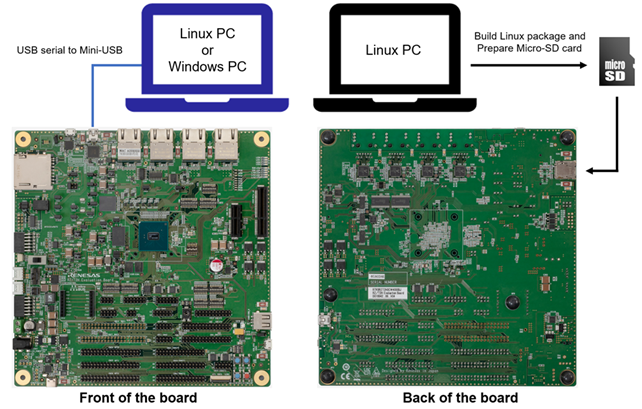
Please insert the micro SD card into the slot.
To set the board to eSD Boot mode, set the DSW3 as below:
| DSW3-1 | DSW3-2 | DSW3-3 | DSW3-4 | DSW3-5 | DSW3-6 | DSW3-7 | DSW3-8 |
|---|---|---|---|---|---|---|---|
| OFF | OFF | ON | OFF | OFF | OFF | ON | OFF |
Please insert the micro SD card into the slot.
Power on and boot
Then, turn ON the power switch, and Linux will be booted from eSD.
- Power switch: SW16
- Power switch: SW1