Appendix for RZ/G
How to boot from eMMC
In this section, the steps to boot from eMMC are described.
Writing Bootloader for eMMC Boot
For the boot operation, EXT_CSD registers of eMMC need to be modified and two boot loader files need to be written to the target board.
After booting the Flash Writer, EM_SECSD command of Flash Writer is used to modify EXT_CSD register of eMMC to enable eMMC boot.
Then, EM_W command of Flash Writer is used to write boot loader binary files. This command receives binary data from the serial port and writes the data to a specified address of the eMMC with information where the data should be loaded on the address of the main memory.
Then, set the SW1 on SOM module to eMMC mode.
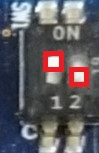
| SW1-1 | SW1-2 |
|---|---|
| ON | OFF |
For example, this part describes how to modify EXT_CSD register and write boot loader files:
>EM_SECSD
  Please Input EXT_CSD Index(H'00 - H'1FF) :b1
  EXT_CSD[B1] = 0x00
  Please Input Value(H'00 - H'FF) :2
  EXT_CSD[B1] = 0x02
>EM_SECSD
  Please Input EXT_CSD Index(H'00 - H'1FF) :b3
  EXT_CSD[B3] = 0x00
  Please Input Value(H'00 - H'FF) :8
  EXT_CSD[B3] = 0x08
>EM_W
EM_W Start --------------
---------------------------------------------------------
Please select,eMMC Partition Area.
 0:User Partition Area   : 62160896 KBytes
  eMMC Sector Cnt : H'0 - H'0768FFFF
 1:Boot Partition 1      : 32256 KBytes
  eMMC Sector Cnt : H'0 - H'0000FBFF
 2:Boot Partition 2      : 32256 KBytes
  eMMC Sector Cnt : H'0 - H'0000FBFF
---------------------------------------------------------
  Select area(0-2)>1
-- Boot Partition 1 Program -----------------------------
Please Input Start Address in sector :1
Please Input Program Start Address : 11e00
Work RAM(H'50000000-H'50FFFFFF) Clear....
please send ! ('.' & CR stop load)
Send the data of bl2_bp_mmc-smarc-rzg2l_pmic.srec from terminal software after the message please send ! is shown.
After successfully downloading the binary, messages like below are shown on the terminal.
Next, write another loader file by using EM_W command again.
> EM_W
EM_W Start --------------
---------------------------------------------------------
Please select,eMMC Partition Area.
 0:User Partition Area   : 62160896 KBytes
  eMMC Sector Cnt : H'0 - H'0768FFFF
 1:Boot Partition 1      : 32256 KBytes
  eMMC Sector Cnt : H'0 - H'0000FBFF
 2:Boot Partition 2      : 32256 KBytes
  eMMC Sector Cnt : H'0 - H'0000FBFF
---------------------------------------------------------
  Select area(0-2)>1
-- Boot Partition 1 Program -----------------------------
Please Input Start Address in sector :100
Please Input Program Start Address : 0
Work RAM(H'50000000-H'50FFFFFF) Clear....
please send ! ('.' & CR stop load)
Send the data of fip-smarc-rzg2l_pmic.srec from terminal software after the message please send ! is shown.
After successfully downloading the binary, messages like below are shown on the terminal.
After writing two loader files normally, turn off the power of the board by changing the SW11.
Note
Address of
EXT_CSDregister of eMMC for eMMC bootAddress Value to write 0xB10x020xB30x08Address for sending each loader binary file for eMMC boot
File name Partition to save to eMMC Address to save to eMMC Address to load to RAM bl2_bp_mmc-smarc-rzg2l_pmic.srec10000000111E00fip-smarc-rzg2l_pmic.srec10000010000000
Then, set the SW1 on SOM module to eMMC mode.
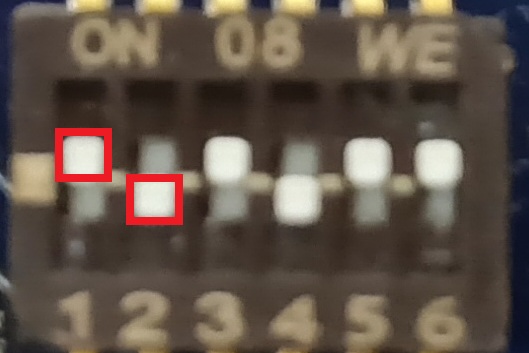
| SW1-1 | SW1-2 | SW1-3 | SW1-4 | SW1-5 | SW1-6 |
|---|---|---|---|---|---|
| ON | OFF | ON | OFF | ON | ON |
For example, this part describes how to modify EXT_CSD register and write boot loader files:
>EM_SECSD
  Please Input EXT_CSD Index(H'00 - H'1FF) :b1
  EXT_CSD[B1] = 0x02
  Please Input Value(H'00 - H'FF) :2
  EXT_CSD[B1] = 0x02
>EM_SECSD
  Please Input EXT_CSD Index(H'00 - H'1FF) :b3
  EXT_CSD[B3] = 0x08
  Please Input Value(H'00 - H'FF) :8
  EXT_CSD[B3] = 0x08
>EM_W
EM_W Start --------------
---------------------------------------------------------
Please select,eMMC Partition Area.
 0:User Partition Area   : 62160896 KBytes
  eMMC Sector Cnt : H'0 - H'0768FFFF
 1:Boot Partition 1      : 32256 KBytes
  eMMC Sector Cnt : H'0 - H'0000FBFF
 2:Boot Partition 2      : 32256 KBytes
  eMMC Sector Cnt : H'0 - H'0000FBFF
---------------------------------------------------------
  Select area(0-2)>1
-- Boot Partition 1 Program -----------------------------
Please Input Start Address in sector :1
Please Input Program Start Address : 11e00
Work RAM(H'50000000-H'50FFFFFF) Clear....
please send ! ('.' & CR stop load)
Send the data of bl2_bp_mmc-smarc-rzg2lc.srec from terminal software after the message please send ! is shown.
After successfully downloading the binary, messages like below are shown on the terminal.
Next, write another loader file by using EM_W command again.
> EM_W
EM_W Start --------------
---------------------------------------------------------
Please select,eMMC Partition Area.
 0:User Partition Area   : 62160896 KBytes
  eMMC Sector Cnt : H'0 - H'0768FFFF
 1:Boot Partition 1      : 32256 KBytes
  eMMC Sector Cnt : H'0 - H'0000FBFF
 2:Boot Partition 2      : 32256 KBytes
  eMMC Sector Cnt : H'0 - H'0000FBFF
---------------------------------------------------------
  Select area(0-2)>1
-- Boot Partition 1 Program -----------------------------
Please Input Start Address in sector :100
Please Input Program Start Address : 0
Work RAM(H'50000000-H'50FFFFFF) Clear....
please send ! ('.' & CR stop load)
Send the data of fip-smarc-rzg2lc.srec from terminal software after the message please send ! is shown.
After successfully downloading the binary, messages like below are shown on the terminal.
After writing two loader files normally, turn off the power of the board by changing the SW11.
Note
Address of
EXT_CSDregister of eMMC for eMMC bootAddress Value to write 0xB10x020xB30x08Address for sending each loader binary file for eMMC boot
File name Partition to save to eMMC Address to save to eMMC Address to load to RAM bl2_bp_mmc-smarc-rzg2lc.srec10000000111E00fip-smarc-rzg2lc.srec10000010000000
Then, set the SW1 on SOM module to eMMC mode.
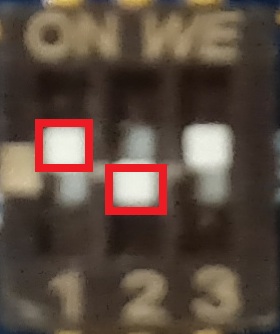
| SW1-1 | SW1-2 | SW1-3 |
|---|---|---|
| ON | OFF | ON |
For example, this part describes how to modify EXT_CSD register and write boot loader files:
>EM_SECSD
  Please Input EXT_CSD Index(H'00 - H'1FF) :b1
  EXT_CSD[B1] = 0x00
  Please Input Value(H'00 - H'FF) :2
  EXT_CSD[B1] = 0x02
>EM_SECSD
  Please Input EXT_CSD Index(H'00 - H'1FF) :b3
  EXT_CSD[B3] = 0x00
  Please Input Value(H'00 - H'FF) :8
  EXT_CSD[B3] = 0x08
>EM_W
EM_W Start --------------
---------------------------------------------------------
Please select,eMMC Partition Area.
 0:User Partition Area   : 62160896 KBytes
  eMMC Sector Cnt : H'0 - H'0768FFFF
 1:Boot Partition 1      : 32256 KBytes
  eMMC Sector Cnt : H'0 - H'0000FBFF
 2:Boot Partition 2      : 32256 KBytes
  eMMC Sector Cnt : H'0 - H'0000FBFF
---------------------------------------------------------
  Select area(0-2)>1
-- Boot Partition 1 Program -----------------------------
Please Input Start Address in sector :1
Please Input Program Start Address : 11e00
Work RAM(H'50000000-H'50FFFFFF) Clear....
please send ! ('.' & CR stop load)
Send the data of bl2_bp_mmc-smarc-rzg2ul.srec from terminal software after the message please send ! is shown.
After successfully downloading the binary, messages like below are shown on the terminal.
Next, write another loader file by using EM_W command again.
> EM_W
EM_W Start --------------
---------------------------------------------------------
Please select,eMMC Partition Area.
 0:User Partition Area   : 62160896 KBytes
  eMMC Sector Cnt : H'0 - H'0768FFFF
 1:Boot Partition 1      : 32256 KBytes
  eMMC Sector Cnt : H'0 - H'0000FBFF
 2:Boot Partition 2      : 32256 KBytes
  eMMC Sector Cnt : H'0 - H'0000FBFF
---------------------------------------------------------
  Select area(0-2)>1
-- Boot Partition 1 Program -----------------------------
Please Input Start Address in sector :100
Please Input Program Start Address : 0
Work RAM(H'50000000-H'50FFFFFF) Clear....
please send ! ('.' & CR stop load)
Send the data of fip-smarc-rzg2ul.srec from terminal software after the message please send ! is shown.
After successfully downloading the binary, messages like below are shown on the terminal.
After writing two loader files normally, turn off the power of the board by changing the SW11.
Note
Address of
EXT_CSDregister of eMMC for eMMC bootAddress Value to write 0xB10x020xB30x08Address for sending each loader binary file for eMMC boot
File name Partition to save to eMMC Address to save to eMMC Address to load to RAM bl2_bp_mmc-smarc-rzg2ul.srec10000000111E00fip-smarc-rzg2ul.srec10000010000000
Then, set the SW_CONFIG on SOM module to eMMC mode.
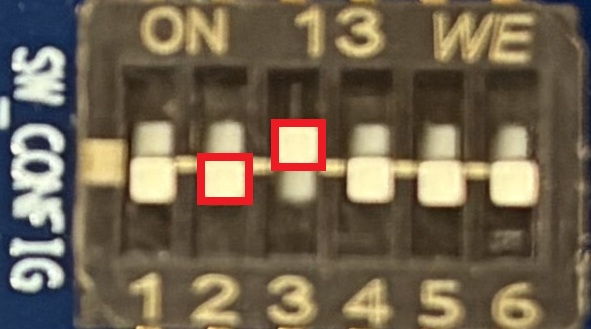
| SW_CONFIG[1] | SW_CONFIG[2] | SW_CONFIG[3] | SW_CONFIG[4] | SW_CONFIG[5] | SW_CONFIG[6] |
|---|---|---|---|---|---|
| OFF | OFF | ON | OFF | OFF | OFF |
For example, this part describes how to modify EXT_CSD register and write boot loader files:
>EM_SECSD
  Please Input EXT_CSD Index(H'00 - H'1FF) :b1
  EXT_CSD[B1] = 0x00
  Please Input Value(H'00 - H'FF) :2
  EXT_CSD[B1] = 0x02
>EM_SECSD
  Please Input EXT_CSD Index(H'00 - H'1FF) :b3
  EXT_CSD[B3] = 0x00
  Please Input Value(H'00 - H'FF) :8
  EXT_CSD[B3] = 0x08
>EM_W
EM_W Start --------------
---------------------------------------------------------
Please select,eMMC Partition Area.
 0:User Partition Area   : 62160896 KBytes
  eMMC Sector Cnt : H'0 - H'0768FFFF
 1:Boot Partition 1      : 32256 KBytes
  eMMC Sector Cnt : H'0 - H'0000FBFF
 2:Boot Partition 2      : 32256 KBytes
  eMMC Sector Cnt : H'0 - H'0000FBFF
---------------------------------------------------------
  Select area(0-2)>1
-- Boot Partition 1 Program -----------------------------
Please Input Start Address in sector :1
Please Input Program Start Address : a1e00
Work RAM(H'50000000-H'50FFFFFF) Clear....
please send ! ('.' & CR stop load)
Send the data of bl2_bp_mmc-smarc-rzg3s.srec from terminal software after the message please send ! is shown.
After successfully downloading the binary, messages like below are shown on the terminal.
Next, write another loader file by using EM_W command again.
> EM_W
EM_W Start --------------
---------------------------------------------------------
Please select,eMMC Partition Area.
 0:User Partition Area   : 62160896 KBytes
  eMMC Sector Cnt : H'0 - H'0768FFFF
 1:Boot Partition 1      : 32256 KBytes
  eMMC Sector Cnt : H'0 - H'0000FBFF
 2:Boot Partition 2      : 32256 KBytes
  eMMC Sector Cnt : H'0 - H'0000FBFF
---------------------------------------------------------
  Select area(0-2)>1
-- Boot Partition 1 Program -----------------------------
Please Input Start Address in sector :300
Please Input Program Start Address : 0
Work RAM(H'50000000-H'50FFFFFF) Clear....
please send ! ('.' & CR stop load)
Send the data of fip-smarc-rzg3s.srec from terminal software after the message please send ! is shown.
After successfully downloading the binary, messages like below are shown on the terminal.
After writing two loader files normally, turn off the power of the board by changing the SW_MODE.
Note
Address of
EXT_CSDregister of eMMC for eMMC bootAddress Value to write 0xB10x020xB30x08Address for sending each loader binary file for eMMC boot
File name Partition to save to eMMC Address to save to eMMC Address to load to RAM bl2_bp_mmc-smarc-rzg3s.srec100000001A1E00fip-smarc-rzg3s.srec10000030000000
Then, set the SYS on SOM module to eMMC mode.
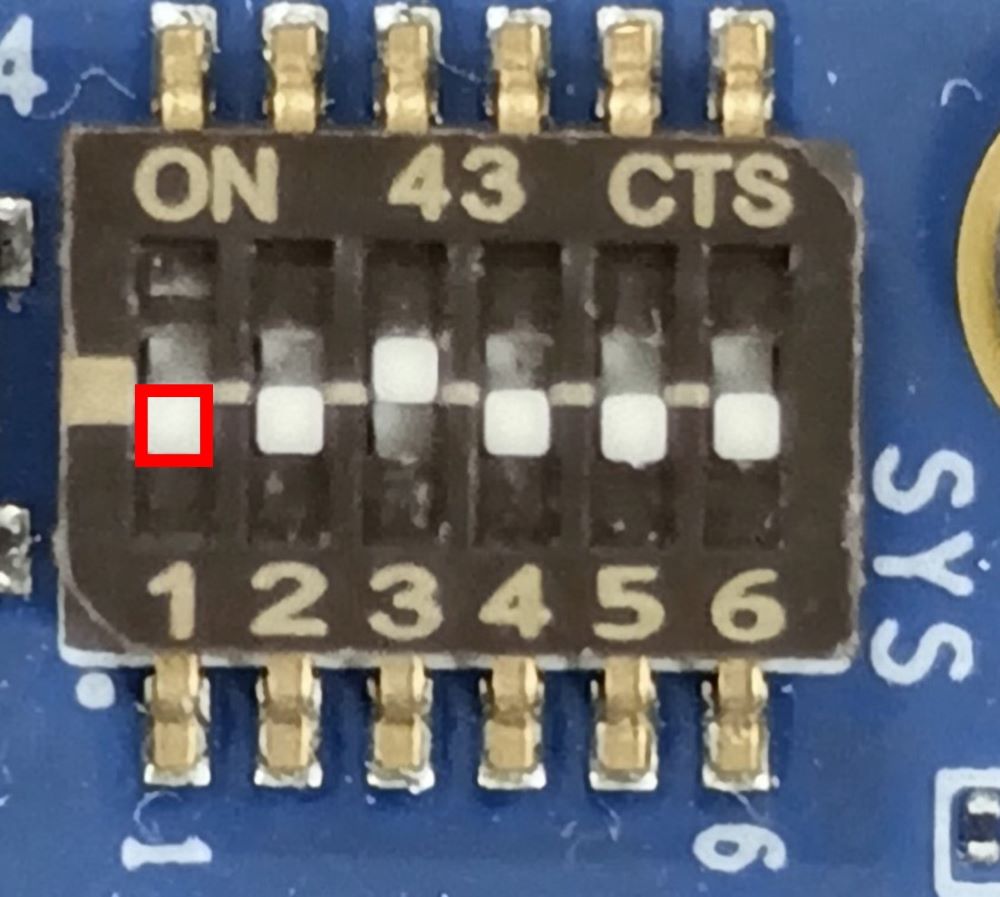
| SW_CONFIG[1] | SW_CONFIG[2] | SW_CONFIG[3] | SW_CONFIG[4] | SW_CONFIG[5] | SW_CONFIG[6] |
|---|---|---|---|---|---|
| OFF | OFF | ON | OFF | OFF | OFF |
For example, this part describes how to modify EXT_CSD register and write boot loader files:
>EM_SECSD
  Please Input EXT_CSD Index(H'00 - H'1FF) :b1
  EXT_CSD[B1] = 0x00
  Please Input Value(H'00 - H'FF) :2
  EXT_CSD[B1] = 0x02
>EM_SECSD
  Please Input EXT_CSD Index(H'00 - H'1FF) :b3
  EXT_CSD[B3] = 0x00
  Please Input Value(H'00 - H'FF) :8
  EXT_CSD[B3] = 0x08
>EM_W
EM_W Start --------------
---------------------------------------------------------
Please select,eMMC Partition Area.
 0:User Partition Area   : 62160896 KBytes
  eMMC Sector Cnt : H'0 - H'0768FFFF
 1:Boot Partition 1      : 32256 KBytes
  eMMC Sector Cnt : H'0 - H'0000FBFF
 2:Boot Partition 2      : 32256 KBytes
  eMMC Sector Cnt : H'0 - H'0000FBFF
---------------------------------------------------------
  Select area(0-2)>1
-- Boot Partition 1 Program -----------------------------
Please Input Start Address in sector :1
Please Input Program Start Address : 21e00
Work RAM(H'40000000-H'4FFFFFFF) Clear....
please send ! ('.' & CR stop load)
Send the data of bl2_bp_mmc-smarc-rzg3l.srec from terminal software after the message please send ! is shown.
After successfully downloading the binary, messages like below are shown on the terminal.
Next, write another loader file by using EM_W command again.
> EM_W
EM_W Start --------------
---------------------------------------------------------
Please select,eMMC Partition Area.
 0:User Partition Area   : 62160896 KBytes
  eMMC Sector Cnt : H'0 - H'0768FFFF
 1:Boot Partition 1      : 32256 KBytes
  eMMC Sector Cnt : H'0 - H'0000FBFF
 2:Boot Partition 2      : 32256 KBytes
  eMMC Sector Cnt : H'0 - H'0000FBFF
---------------------------------------------------------
  Select area(0-2)>1
-- Boot Partition 1 Program -----------------------------
Please Input Start Address in sector :300
Please Input Program Start Address : 0
Work RAM(H'40000000-H'4FFFFFFF) Clear....
please send ! ('.' & CR stop load)
Send the data of fip-smarc-rzg3l.srec from terminal software after the message please send ! is shown.
After successfully downloading the binary, messages like below are shown on the terminal.
After writing two loader files normally, turn off the power of the board by changing the SW_MODE.
Note
Address of
EXT_CSDregister of eMMC for eMMC bootAddress Value to write 0xB10x020xB30x08Address for sending each loader binary file for eMMC boot
File name Partition to save to eMMC Address to save to eMMC Address to load to RAM bl2_bp_mmc-smarc-rzg3l.srec10000000121E00fip-smarc-rzg3l.srec10000030000000
Create a microSD card to boot Linux for eMMC boot
Please create a microSD card (see Step 4: Deploy Renesas RZ Linux BSP Plus).
After that, please return to the following instructions before unmounting the micro SD card.
Copy the kernel image, device tree file, and rootfs to the second partition of the microSD card.
Note
Where <image name> is one of the following:
core-image-minimalcore-image-weston
cd /media/user/rootfs/root/
sudo cp ${WORK}/build/tmp/deploy/./../getting_started/images/smarc-rzg2l/Image-smarc-rzg2l.bin ./
sudo cp ${WORK}/build/tmp/deploy/./../getting_started/images/smarc-rzg2l/r9a07g044l2-smarc.dtb ./
sudo cp ${WORK}/build/tmp/deploy/./../getting_started/images/smarc-rzg2l/<image name>-smarc-rzg2l.rootfs.tar.bz2 ./
cd ${WORK}
sudo umount /media/user/rootfs
Note
Where <image name> is one of the following:
core-image-minimalcore-image-weston
cd /media/user/rootfs/root/
sudo cp ${WORK}/build/tmp/deploy/./../getting_started/images/smarc-rzg2lc/Image-smarc-rzg2lc.bin ./
sudo cp ${WORK}/build/tmp/deploy/./../getting_started/images/smarc-rzg2lc/r9a07g044c2-smarc.dtb ./
sudo cp ${WORK}/build/tmp/deploy/./../getting_started/images/smarc-rzg2lc/<image name>-smarc-rzg2lc.rootfs.tar.bz2 ./
cd ${WORK}
sudo umount /media/user/rootfs
Note
Where <image name> is one of the following:
core-image-minimal
cd /media/user/rootfs/root/
sudo cp ${WORK}/build/tmp/deploy/./../getting_started/images/smarc-rzg2ul/Image-smarc-rzg2ul.bin ./
sudo cp ${WORK}/build/tmp/deploy/./../getting_started/images/smarc-rzg2ul/r9a07g043u11-smarc.dtb ./
sudo cp ${WORK}/build/tmp/deploy/./../getting_started/images/smarc-rzg2ul/<image name>-smarc-rzg2ul.rootfs.tar.bz2 ./
cd ${WORK}
sudo umount /media/user/rootfs
Note
Where <image name> is one of the following:
core-image-minimal
Note
Where <image name> is one of the following:
core-image-minimalcore-image-weston
Writing rootfs to eMMC
To set the board to eMMC Boot mode, set the SW11 as below:
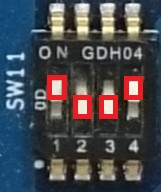
| SW11-1 | SW11-2 | SW11-3 | SW11-4 |
|---|---|---|---|
| ON | OFF | OFF | ON |
Turn on the board by pressing the reset button. After Linux boots, please log in as root and create partitions on the eMMC by running the following commands.
root@smarc-rzg2l:~# fdisk /dev/mmcblk0

Welcome to fdisk (util-linux 2.35.1).
Changes will remain in memory only, until you decide to write them.
Be careful before using the write command.

Command (m for help): o
Created a new DOS disklabel with disk identifier 0xf3d53104.

Command (m for help): n
Partition type
   p   primary partition (1-4)
   e   extended
p

Partition number (1-4): 1
First sector (16-124321791, default 16): 16
Last sector or +size{,K,M,G,T} (16-124321791, default 124321791): +500M

Command (m for help): n
Partition type
   p   primary partition (1-4)
   e   extended
p

Partition number (1-4): 2
First sector (1024016-124321791, default 1024016): 1024016
Last sector or +size{,K,M,G,T} (1024016-124321791, default 124321791): 124321791

Command (m for help): p
Disk /dev/mmcblk0: 59 GB, 63652757504 bytes, 124321792 sectors
1942528 cylinders, 4 heads, 16 sectors/track
Units: sectors of 1 * 512 = 512 bytes

Device       Boot StartCHS    EndCHS        StartLBA     EndLBA    Sectors  Size Id Type
/dev/mmcblk0p1    0,1,1       1023,3,16           16    1024015    1024000  500M 83 Linux
/dev/mmcblk0p2    1023,3,16   1023,3,16      1024016  124321791  123297776 58.7G 83 Linux

Command (m for help): w
The partition table has been altered.
Calling ioctl() to re-read partition table.

root@smarc-rzg2l:~#
Format eMMC.
Format the eMMC and write the kernel, device tree, and rootfs.
Note
Where <image name> is one of the following:
core-image-minimalcore-image-weston
To set the board to eMMC Boot mode, set the SW11 as below:
| SW11-1 | SW11-2 | SW11-3 | SW11-4 |
|---|---|---|---|
| ON | OFF | OFF | ON |
Turn on the board by pressing the reset button. After Linux boots, please log in as root and create partitions on the eMMC by running the following commands.
root@smarc-rzg2lc:~# fdisk /dev/mmcblk0

Welcome to fdisk (util-linux 2.35.1).
Changes will remain in memory only, until you decide to write them.
Be careful before using the write command.

Command (m for help): o
Created a new DOS disklabel with disk identifier 0xf3d53104.

Command (m for help): n
Partition type
   p   primary partition (1-4)
   e   extended
p

Partition number (1-4): 1
FFirst sector (32-124321791, default 32): 32
Last sector or +size{,K,M,G,T} (32-124321791, default 124321791): +500M

Command (m for help): n
Partition type
   p   primary partition (1-4)
   e   extended
p

Partition number (1-4): 2
First sector (1024032-124321791, default 1024032): 1024032
Last sector or +size{,K,M,G,T} (1024032-124321791, default 124321791): 124321791

Command (m for help): p
Disk /dev/mmcblk0: 59 GB, 63652757504 bytes, 124321792 sectors
971264 cylinders, 4 heads, 32 sectors/track
Units: sectors of 1 * 512 = 512 bytes

Device       Boot StartCHS    EndCHS        StartLBA     EndLBA    Sectors  Size Id Type
/dev/mmcblk0p1    0,1,1       1023,3,32           32    1024031    1024000  500M 83 Linux
/dev/mmcblk0p2    1023,3,32   1023,3,32      1024032  124321791  123297760 58.7G 83 Linux

Command (m for help): w
The partition table has been altered.
Calling ioctl() to re-read partition table.

root@smarc-rzg2lc:~#
Format eMMC.
Format the eMMC and write the kernel, device tree, and rootfs.
Note
Where <image name> is one of the following:
core-image-minimalcore-image-weston
To set the board to eMMC Boot mode, set the SW11 as below:
| SW11-1 | SW11-2 | SW11-3 | SW11-4 |
|---|---|---|---|
| ON | OFF | OFF | ON |
Turn on the board by pressing the reset button. After Linux boots, please log in as root and create partitions on the eMMC by running the following commands.
root@smarc-rzg2ul:~# fdisk /dev/mmcblk0

Welcome to fdisk (util-linux 2.35.1).
Changes will remain in memory only, until you decide to write them.
Be careful before using the write command.

Command (m for help): o
Created a new DOS disklabel with disk identifier 0xf3d53104.

Command (m for help): n
Partition type
   p   primary partition (1-4)
   e   extended
p

Partition number (1-4): 1
FFirst sector (32-124321791, default 32): 32
Last sector or +size{,K,M,G,T} (32-124321791, default 124321791): +500M

Command (m for help): n
Partition type
   p   primary partition (1-4)
   e   extended
p

Partition number (1-4): 2
First sector (1024032-124321791, default 1024032): 1024032
Last sector or +size{,K,M,G,T} (1024032-124321791, default 124321791): 124321791

Command (m for help): p
Disk /dev/mmcblk0: 59 GB, 63652757504 bytes, 124321792 sectors
971264 cylinders, 4 heads, 32 sectors/track
Units: sectors of 1 * 512 = 512 bytes

Device       Boot StartCHS    EndCHS        StartLBA     EndLBA    Sectors  Size Id Type
/dev/mmcblk0p1    0,1,1       1023,3,32           32    1024031    1024000  500M 83 Linux
/dev/mmcblk0p2    1023,3,32   1023,3,32      1024032  124321791  123297760 58.7G 83 Linux

Command (m for help): w
The partition table has been altered.
Calling ioctl() to re-read partition table.

root@smarc-rzg2ul:~#
Format eMMC.
Format the eMMC and write the kernel, device tree, and rootfs.
Note
Where <image name> is one of the following:
core-image-minimal
To set the board to eMMC Boot mode, set the SW_MODE as below:
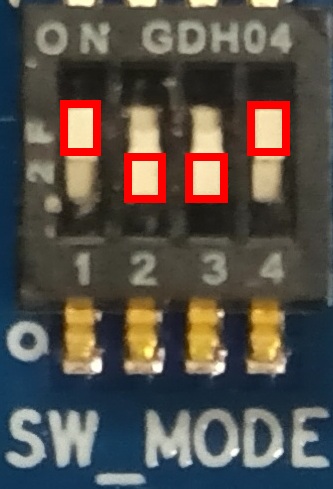
| SW_MODE[1] | SW_MODE[2] | SW_MODE[3] | SW_MODE[4] |
|---|---|---|---|
| ON | OFF | OFF | ON |
Turn on the board by pressing the reset button. After Linux boots, please log in as root and create partitions on the eMMC by running the following commands.
root@smarc-rzg3s:~# fdisk /dev/mmcblk0

Welcome to fdisk (util-linux 2.35.1).
Changes will remain in memory only, until you decide to write them.
Be careful before using the write command.

Command (m for help): o
Created a new DOS disklabel with disk identifier 0xf3d53104.

Command (m for help): n
Partition type
   p   primary partition (1-4)
   e   extended
p

Partition number (1-4): 1
First sector (16-124321791, default 16): 16
Last sector or +size{,K,M,G,T} (16-124321791, default 124321791): +500M

Command (m for help): n
Partition type
   p   primary partition (1-4)
   e   extended
p

Partition number (1-4): 2
First sector (1024016-124321791, default 1024016):1024016
Last sector or +size{,K,M,G,T} (1024016-124321791, default 124321791): 124321791

Command (m for help): p
Disk /dev/mmcblk0: 59 GB, 63652757504 bytes, 124321792 sectors
1942528 cylinders, 4 heads, 16 sectors/track
Units: sectors of 1 * 512 = 512 bytes

Device       Boot StartCHS    EndCHS        StartLBA     EndLBA    Sectors  Size Id Type
/dev/mmcblk0p1    0,1,1       1023,3,16           16    1024015    1024000  500M 83 Linux
/dev/mmcblk0p2    1023,3,16   1023,3,16      1024016  124321791  123297776 58.7G 83 Linux

Command (m for help): w
The partition table has been altered.
Calling ioctl() to re-read partition table.

root@smarc-rzg3s:~#
Format eMMC.
Format the eMMC and write the kernel, device tree, and rootfs.
Note
Where <image name> is one of the following:
core-image-minimal
To set the board to eMMC Boot mode, set the SW_MODE as below:
| SW_MODE[1] | SW_MODE[2] | SW_MODE[3] | SW_MODE[4] |
|---|---|---|---|
| ON | OFF | OFF | ON |
Turn on the board by pressing the reset button. After Linux boots, please log in as root and create partitions on the eMMC by running the following commands.
Note
Where <image name> is one of the following:
core-image-minimalcore-image-weston
Setting U-boot for eMMC boot
Reset the board by pressing the reset button and interrupt the boot process by pressing the Enter key.
U-Boot 2024.07 (Sep 12 2025 - 16:08:34 +0000)

CPU:   Renesas Electronics CPU rev 1.0
Model: smarc-rzg2l
DRAM:  1.9 GiB
SF: Detected mt25qu512a with page size 256 Bytes, erase size 4 KiB, total 64 MiB
Core:  33 devices, 19 uclasses, devicetree: separate
WDT:   watchdog@0000000012800800
WDT:   Started watchdog@12800800 with servicing every 1000ms (60s timeout)
MMC:   sd@11c00000: 0, sd@11c10000: 1
Loading Environment from MMC... Reading from MMC(0)... OK
In:    serial@1004b800
Out:   serial@1004b800
Err:   serial@1004b800
WDT:   Started watchdog@12800800 with servicing every 1000ms (60s timeout)
U-boot WDT started!
Net:   eth0: ethernet@11c20000, eth1: ethernet@11c30000
Hit any key to stop autoboot:  0
=>
Set environment variables in the u-boot environment to boot from eMMC.
setenv bootargs 'root=/dev/mmcblk0p2 rootwait'
setenv bootcmd 'mmc dev 1; ext4load mmc 0:1 0x48080000 Image-smarc-rzg2l.bin; ext4load mmc 0:1 0x48000000 r9a07g044l2-smarc.dtb; booti 0x48080000 - 0x48000000'
saveenv
Please reset the board again for eMMC boot.
Reset the board by pressing the reset button and interrupt the boot process by pressing the Enter key.
U-Boot 2024.07 (Sep 12 2025 - 16:08:34 +0000)

CPU:   Renesas Electronics CPU rev 1.0
Model: smarc-rzg2lc
DRAM:  896 MiB
SF: Detected mt25qu512a with page size 256 Bytes, erase size 4 KiB, total 64 MiB
Core:  29 devices, 19 uclasses, devicetree: separate
WDT:   watchdog@0000000012800800
WDT:   Started watchdog@12800800 with servicing every 1000ms (60s timeout)
MMC:   sd@11c00000: 0, sd@11c10000: 1
Loading Environment from MMC... Reading from MMC(0)... OK
In:    serial@1004b800
Out:   serial@1004b800
Err:   serial@1004b800
WDT:   Started watchdog@12800800 with servicing every 1000ms (60s timeout)
U-boot WDT started!
Net:   eth0: ethernet@11c20000
Hit any key to stop autoboot:  0
=>
Set environment variables in the u-boot environment to boot from eMMC.
setenv bootargs 'root=/dev/mmcblk0p2 rootwait'
setenv bootcmd 'mmc dev 1; ext4load mmc 0:1 0x48080000 Image-smarc-rzg2lc.bin; ext4load mmc 0:1 0x48000000 r9a07g044c2-smarc.dtb; booti 0x48080000 - 0x48000000'
saveenv
Please reset the board again for eMMC boot.
Reset the board by pressing the reset button and interrupt the boot process by pressing the Enter key.
U-Boot 2024.07 (Sep 12 2025 - 16:08:34 +0000)

CPU:   Renesas Electronics CPU rev 1.0
Model: smarc-rzg2ul
DRAM:  896 MiB
SW_ET0_EN: ON
Core:  30 devices, 20 uclasses, devicetree: separate
WDT:   watchdog@0000000012800800
WDT:   Started watchdog@12800800 with servicing every 1000ms (60s timeout)
MMC:   sd@11c00000: 0, sd@11c10000: 1
Loading Environment from MMC... Reading from MMC(0)... OK
In:    serial@1004b800
Out:   serial@1004b800
Err:   serial@1004b800
WDT:   Started watchdog@12800800 with servicing every 1000ms (60s timeout)
U-boot WDT started!
Net:   eth0: ethernet@11c30000
Hit any key to stop autoboot:  0
=>
Set environment variables in the u-boot environment to boot from eMMC.
setenv bootargs 'root=/dev/mmcblk0p2 rootwait'
setenv bootcmd 'mmc dev 1; ext4load mmc 0:1 0x48080000 Image-smarc-rzg2ul.bin; ext4load mmc 0:1 0x48000000 r9a07g043u11-smarc.dtb; booti 0x48080000 - 0x48000000'
saveenv
Please reset the board again for eMMC boot.
Reset the board by pressing the reset button and interrupt the boot process by pressing the Enter key.
U-Boot 2024.07 (Sep 12 2025 - 16:08:34 +0000)

CPU:   Renesas Electronics CPU rev 1.0
Model: smarc-rzg3s
DRAM:  896 MiB
Core:  31 devices, 15 uclasses, devicetree: separate
MMC:   sd@11c00000: 0, sd@11c10000: 1, sd@11c20000: 2
Loading Environment from MMC... Reading from MMC(0)... OK
In:    serial@1004b800
Out:   serial@1004b800
Err:   serial@1004b800
Net:
Error: ethernet@11c30000 No valid MAC address found.
No ethernet found.

Hit any key to stop autoboot:  0
=>
Set environment variables in the u-boot environment to boot from eMMC.
Please reset the board again for eMMC boot.
Reset the board by pressing the reset button and interrupt the boot process by pressing the Enter key.
U-Boot 2024.07 (Sep 12 2025 - 16:08:34 +0000)

CPU:   Renesas Electronics CPU rev 1.0
Model: smarc-rzg3l
DRAM:  896 MiB
Core:  31 devices, 15 uclasses, devicetree: separate
MMC:   sd@11c00000: 0, sd@11c10000: 1, sd@11c20000: 2
Loading Environment from MMC... Reading from MMC(0)... OK
In:    serial@1004b800
Out:   serial@1004b800
Err:   serial@1004b800
Net:
Error: ethernet@11c30000 No valid MAC address found.
No ethernet found.

Hit any key to stop autoboot:  0
=>
Set environment variables in the u-boot environment to boot from eMMC.
Please reset the board again for eMMC boot.
How to boot from eSD
In this section, the steps to boot from eSD are described.
Prepare micro SD card
Prepare the micro SD card using the wic image file.
Two files (bl2_bp_esd-smarc-rzg2l_pmic.bin and fip-smarc-rzg2l_pmic.bin) are used for boot from eSD.
File and directory in the micro SD card
Type/Number
Filesystem
Contents
Primary #1
FAT32
Flash_Writer_SCIF_RZG2L_SMARC_PMIC_DDR4_2GB_1PCS.motbl2_bp_mmc-smarc-rzg2l_pmic.srecbl2_bp_spi-smarc-rzg2l_pmic.srecbl2_bp_esd-smarc-rzg2l_pmic.binfip-smarc-rzg2l_pmic.srecfip-smarc-rzg2l_pmic.bin
Primary #2
Ext4
./
├── bin
├── boot
│   ├── Image
│   ├── Image-6.12.34-cip3-yocto-standard-gfd6f2e323a18
│   └── r9a07g044l2-smarc.dtb
├── dev
├── etc
├── home
├── lib
├── media
├── mnt
├── proc
├── root
├── run
├── sbin
├── srv
├── sys
├── tmp
├── usr
└── var
Prepare the micro SD card using the wic image file.
Two files (bl2_bp_esd-smarc-rzg2lc.bin and fip-smarc-rzg2lc.bin) are used for boot from eSD.
File and directory in the micro SD card
Type/Number
Filesystem
Contents
Primary #1
FAT32
Flash_Writer_SCIF_RZG2LC_SMARC_DDR4_1GB_1PCS.motbl2_bp_mmc-smarc-rzg2lc.srecbl2_bp_spi-smarc-rzg2lc.srecbl2_bp_esd-smarc-rzg2lc.binfip-smarc-rzg2lc.srecfip-smarc-rzg2lc.bin
Primary #2
Ext4
./
├── bin
├── boot
│   ├── Image
│   ├── Image-6.12.34-cip3-yocto-standard-gb105f79b143c
│   └── r9a07g044c2-smarc.dtb
├── dev
├── etc
├── home
├── lib
├── media
├── mnt
├── proc
├── root
├── run
├── sbin
├── srv
├── sys
├── tmp
├── usr
└── var
Prepare the micro SD card using the wic image file.
Two files (bl2_bp_esd-smarc-rzg2ul.bin and fip-smarc-rzg2ul.bin) are used for boot from eSD.
File and directory in the micro SD card
Type/Number
Filesystem
Contents
Primary #1
FAT32
Flash_Writer_SCIF_RZG2UL_SMARC_DDR4_1GB_1PCS.motbl2_bp_mmc-smarc-rzg2ul.srecbl2_bp_spi-smarc-rzg2ul.srecbl2_bp_esd-smarc-rzg2ul.binfip-smarc-rzg2ul.srecfip-smarc-rzg2ul.bin
Primary #2
Ext4
./
├── bin
├── boot
│   ├── Image
│   ├── Image-6.12.34-cip3-yocto-standard-gfd5929f36c66
│   └── r9a07g043u11-smarc.dtb
├── dev
├── etc
├── home
├── lib
├── media
├── mnt
├── proc
├── root
├── run
├── sbin
├── srv
├── sys
├── tmp
├── usr
└── var
Prepare the micro SD card using the wic image file.
Two files (bl2_bp_esd-smarc-rzg3s.bin and fip-smarc-rzg3s.bin) are used for boot from eSD.
File and directory in the micro SD card
Type/Number
Filesystem
Contents
Primary #1
FAT32
FlashWriter-smarc-rzg3s.motbl2_bp_mmc-smarc-rzg3s.srecbl2_bp_spi-smarc-rzg3s.srecbl2_bp_esd-smarc-rzg3s.binfip-smarc-rzg3s.srecfip-smarc-rzg3s.bin
Primary #2
Ext4
./
├── bin
├── boot
│   ├── Image
│   ├── Image-6.12.34-cip3-yocto-standard-gfd5929f36c66
│   └── r9a08g045s33-smarc.dtb
├── dev
├── etc
├── home
├── lib
├── media
├── mnt
├── proc
├── root
├── run
├── sbin
├── srv
├── sys
├── tmp
├── usr
└── var
Prepare the micro SD card using the wic image file.
Two files (bl2_bp_esd-smarc-rzg3l.bin and fip-smarc-rzg3l.bin) are used for boot from eSD.
File and directory in the micro SD card
Type/Number
Filesystem
Contents
Primary #1
FAT32
Flash_Writer_SCIF_RZG3L_SMARC_LPDDR4.motbl2_bp_mmc-smarc-rzg3l.srecbl2_bp_spi-smarc-rzg3l.srecbl2_bp_esd-smarc-rzg3l.binfip-smarc-rzg3l.srecfip-smarc-rzg3l.bin
Primary #2
Ext4
./
├── bin
├── boot
   ├─ Image
   ├─ Image-smarc-rzg3l.bin             |
   └─ r9a08g046l48-smarc.dtb
├── dev
├── etc
├── home
├── lib
├── media
├── mnt
├── proc
├── root
├── run
├── sbin
├── srv
├── sys
├── tmp
├── usr
└── var
Set SMARC EVK board for eSD boot
To set the board to eSD Boot mode, set the SW11 as below:
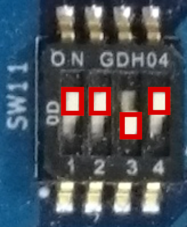
| SW11-1 | SW11-2 | SW11-3 | SW11-4 |
|---|---|---|---|
| ON | ON | OFF | ON |
Then, change SW1 on the module to select micro SD card slot instead of eMMC.
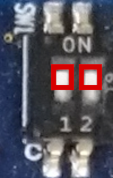
| SW1-1 | SW1-2 |
|---|---|
| ON | ON |
Please insert the micro SD card into the SOM module slot.
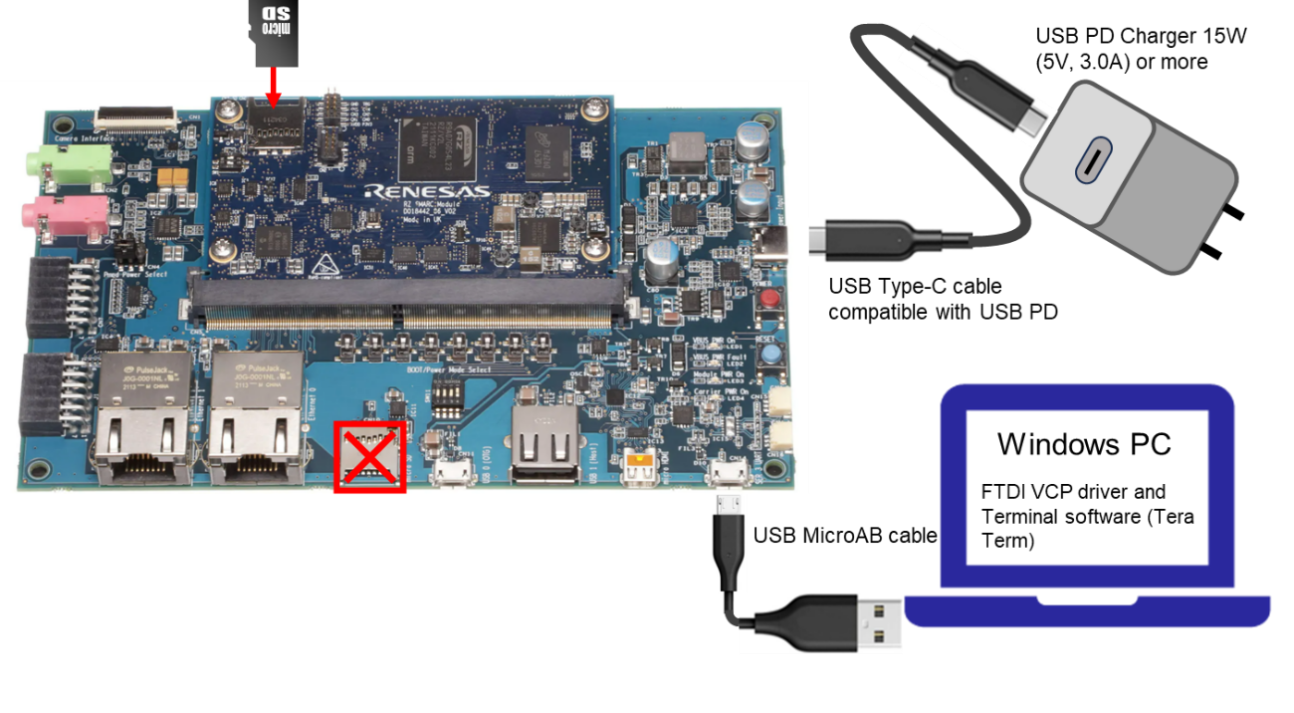
To set the board to eSD Boot mode, set the SW11 as below:
| SW11-1 | SW11-2 | SW11-3 | SW11-4 |
|---|---|---|---|
| ON | ON | OFF | ON |
Then, change SW1 on the module to select micro SD card slot instead of eMMC.
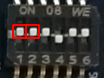
| SW1-1 | SW1-2 | SW1-3 | SW1-4 | SW1-5 | SW1-6 |
|---|---|---|---|---|---|
| ON | ON | ON | OFF | ON | ON |
Please insert the micro SD card into the SOM module slot.
To set the board to eSD Boot mode, set the SW11 as below:
| SW11-1 | SW11-2 | SW11-3 | SW11-4 |
|---|---|---|---|
| ON | ON | OFF | ON |
Then, change SW1 on the module to select micro SD card slot instead of eMMC.

| SW1-1 | SW1-2 | SW1-3 |
|---|---|---|
| ON | ON | ON |
Please insert the micro SD card into the SOM module slot.
To set the board to eSD Boot mode, set the SW_MODE as below:
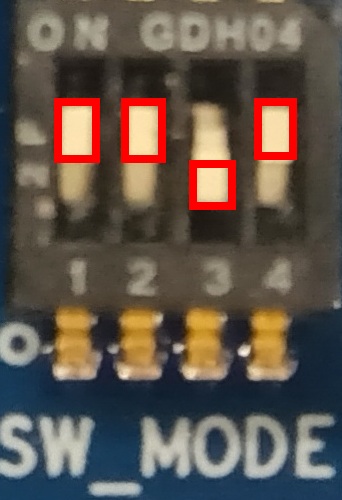
| SW_MODE[1] | SW_MODE[2] | SW_MODE[3] | SW_MODE[4] |
|---|---|---|---|
| ON | ON | OFF | ON |
Then, change SW_CONFIG on the module to enable micro SD card slot.
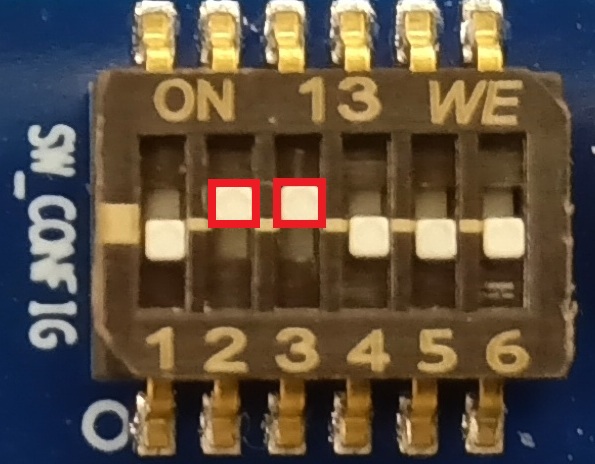
| SW_CONFIG[1] | SW_CONFIG[2] | SW_CONFIG[3] | SW_CONFIG[4] | SW_CONFIG[5] | SW_CONFIG[6] |
|---|---|---|---|---|---|
| OFF | ON | ON | OFF | OFF | OFF |
Please insert the micro SD card into the SOM module slot.
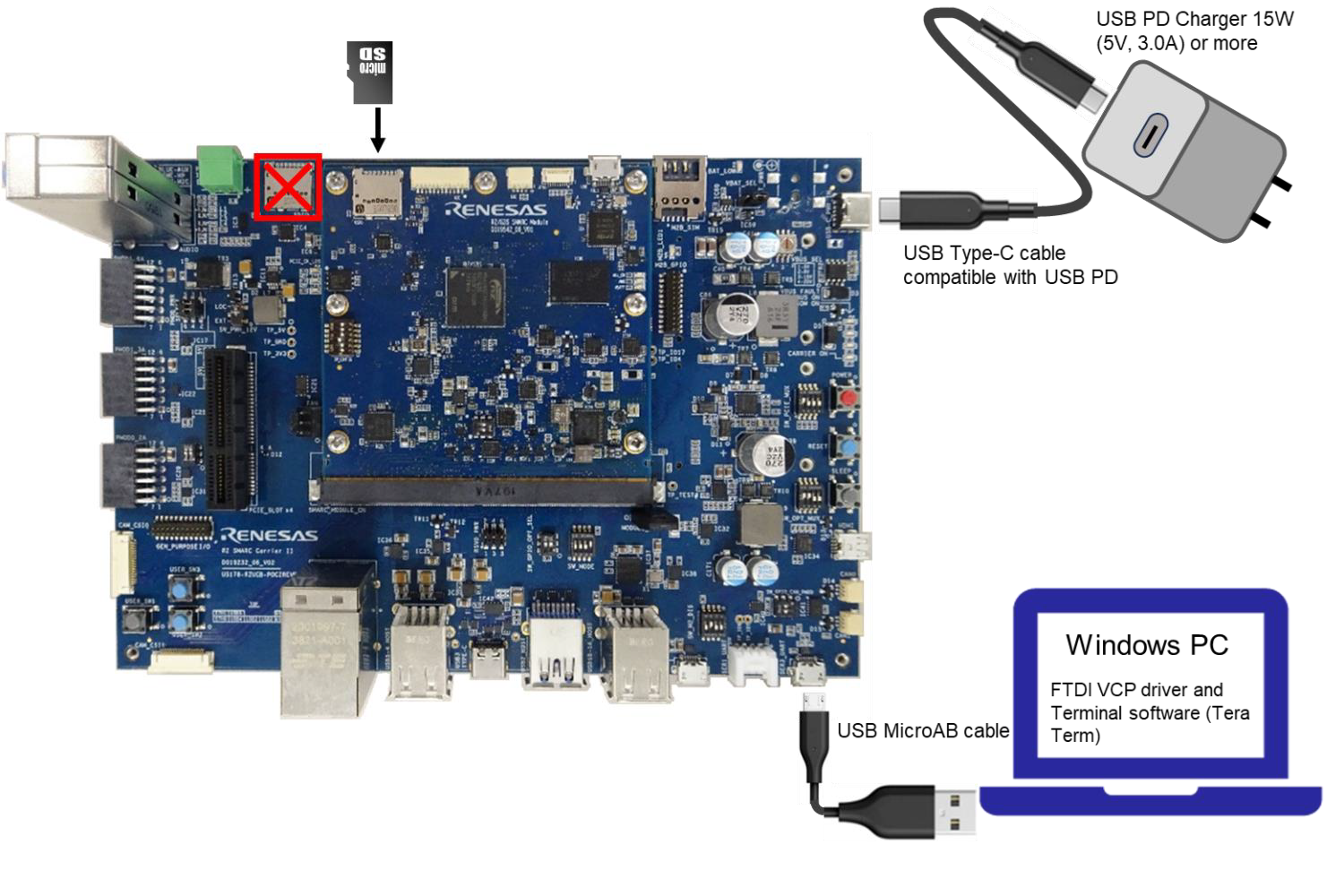
To set the board to eSD Boot mode, set the SW_MODE as below:
| SW_MODE[1] | SW_MODE[2] | SW_MODE[3] | SW_MODE[4] |
|---|---|---|---|
| ON | ON | OFF | ON |
Then, change SYS on the module to enable micro SD card slot.
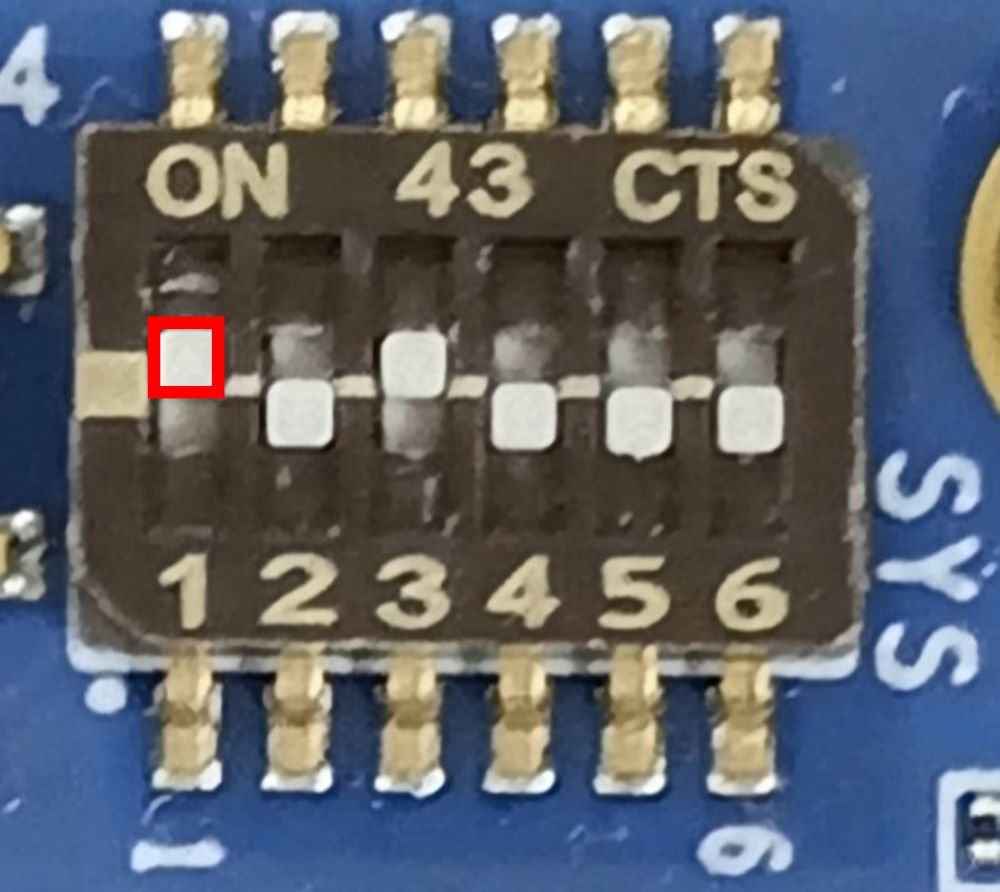
| SW_CONFIG[1] | SW_CONFIG[2] | SW_CONFIG[3] | SW_CONFIG[4] | SW_CONFIG[5] | SW_CONFIG[6] |
|---|---|---|---|---|---|
| ON | OFF | ON | OFF | OFF | OFF |
Please insert the micro SD card into the SOM module slot.
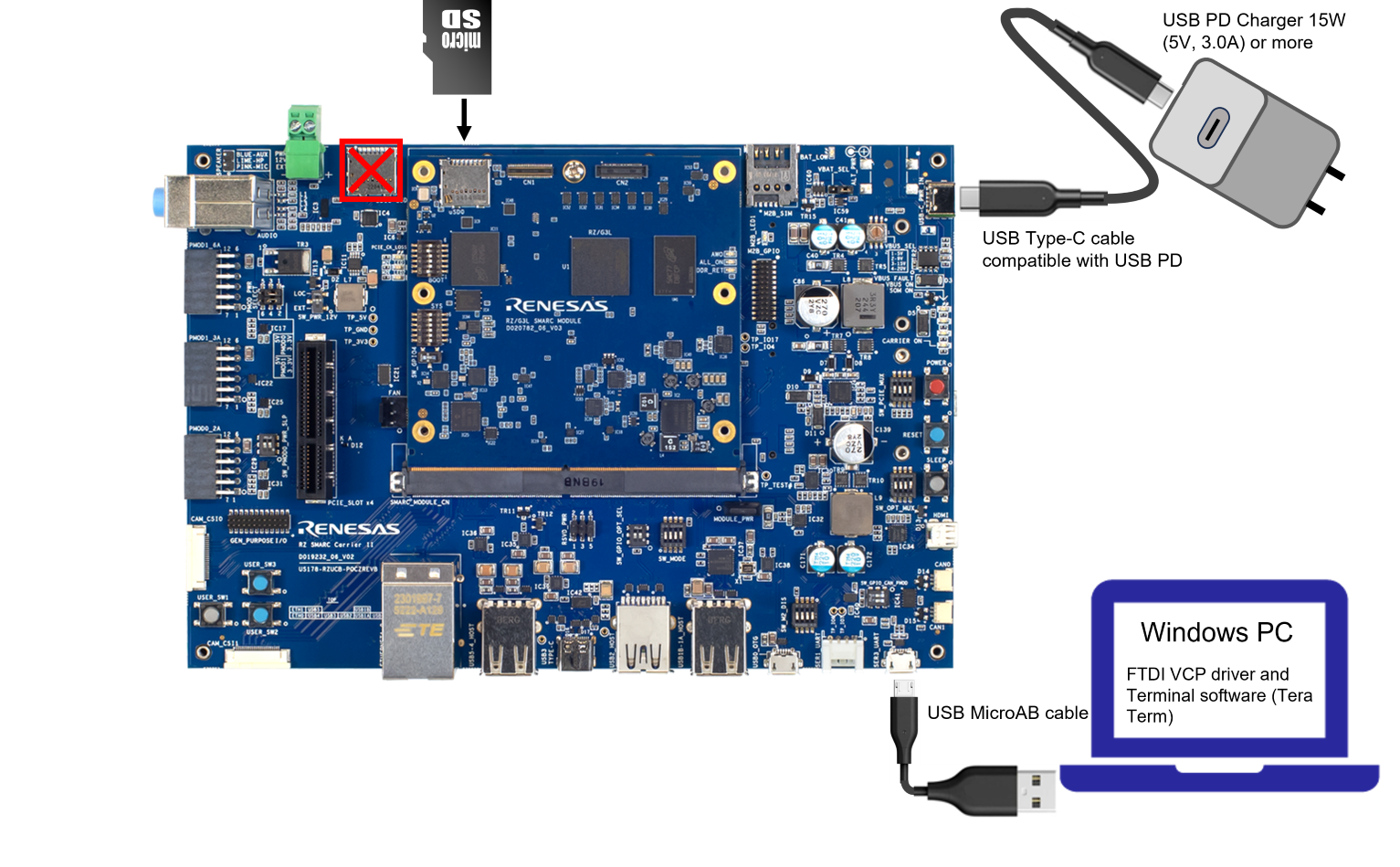
Power on and boot
After pressing the POWER button to turn on the power and RESET button, Linux will be booted from eSD.
NOTICE:  BL2: v2.10.5(release):2.10.5/rz_1.1.0-dirty
NOTICE:  BL2: Built : 13:04:30, Sep 25 2025
NOTICE:  BL2: RZ/G2L
NOTICE:  BL2: SYS_LSI_MODE: 0x0
NOTICE:  BL2: SYS_LSI_DEVID: 0x1841c447
NOTICE:  BL2: SYS_LSI_PRR: 0x0
NOTICE:  BL2: Booting BL31
NOTICE:  BL31: v2.10.5(release):2.10.5/rz_1.1.0-dirty
NOTICE:  BL31: Built : 13:04:30, Sep 25 2025


U-Boot 2024.07 (Sep 12 2025 - 16:08:34 +0000)

CPU:   Renesas Electronics CPU rev 1.0
Model: smarc-rzg2l
DRAM:  1.9 GiB
SF: Detected mt25qu512a with page size 256 Bytes, erase size 4 KiB, total 64 MiB
Core:  33 devices, 19 uclasses, devicetree: separate
WDT:   watchdog@0000000012800800
WDT:   Started watchdog@12800800 with servicing every 1000ms (60s timeout)
MMC:   sd@11c00000: 0, sd@11c10000: 1
Loading Environment from MMC... Reading from MMC(0)... *** Warning - bad CRC, using default environment

In:    serial@1004b800
Out:   serial@1004b800
Err:   serial@1004b800
WDT:   Started watchdog@12800800 with servicing every 1000ms (0s timeout)
U-boot WDT started!
Net:
Warning: ethernet@11c20000 (eth0) using random MAC address - ca:85:51:ea:88:d2
eth0: ethernet@11c20000
Warning: ethernet@11c30000 (eth1) using random MAC address - 4a:64:b3:46:91:8f, eth1: ethernet@11c30000

Hit any key to stop autoboot:  0
## Resetting to default environment
Card did not respond to voltage select! : -110
26690048 bytes read in 2086 ms (12.2 MiB/s)
48482 bytes read in 5 ms (9.2 MiB/s)
Moving Image from 0x48080000 to 0x48200000, end=49c30000
## Flattened Device Tree blob at 48000000
   Booting using the fdt blob at 0x48000000
Working FDT set to 48000000
   Loading Device Tree to 0000000057ff1000, end 0000000057fffd61 ... OK
Working FDT set to 57ff1000
Changing the current FDT in 57ff1000.
   Config Node /soc/mmc@11c00000
      Set property vmmc-supply : <&/regulator-vcc-sdhi0>
   Config Node /soc/mmc@11c00000
      Set property vqmmc-supply : <&/regulator-vccq-sdhi0>

Starting kernel ...

[    0.000000] Booting Linux on physical CPU 0x0000000000 [0x412fd050]
[    0.000000] Linux version 6.12.34-cip3-yocto-standard-gfd6f2e323a18 (oe-user@oe-host)
:
:
Poky (Yocto Project Reference Distro) 5.0.11 smarc-rzg2l ttySC0

smarc-rzg2l login: root
root@smarc-rzg2l:~#
After pressing the POWER button to turn on the power and RESET button, Linux will be booted from eSD.
NOTICE:  BL2: v2.10.5(release):2.10.5/rz_1.1.0-dirty
NOTICE:  BL2: Built : 13:04:30, Sep 25 2025
NOTICE:  BL2: RZ/G2LC
NOTICE:  BL2: SYS_LSI_MODE: 0x0
NOTICE:  BL2: SYS_LSI_DEVID: 0x1841c447
NOTICE:  BL2: SYS_LSI_PRR: 0x0
NOTICE:  BL2: Booting BL31
NOTICE:  BL31: v2.10.5(release):2.10.5/rz_1.1.0-dirty
NOTICE:  BL31: Built : 13:04:30, Sep 25 2025


U-Boot 2024.07 (Sep 12 2025 - 16:08:34 +0000)

CPU:   Renesas Electronics CPU rev 1.0
Model: smarc-rzg2lc
DRAM:  896 MiB
SF: Detected mt25qu512a with page size 256 Bytes, erase size 4 KiB, total 64 MiB
Core:  29 devices, 19 uclasses, devicetree: separate
WDT:   watchdog@0000000012800800
WDT:   Started watchdog@12800800 with servicing every 1000ms (60s timeout)
MMC:   sd@11c00000: 0, sd@11c10000: 1
Loading Environment from MMC... Reading from MMC(0)... *** Warning - bad CRC, using default environment

In:    serial@1004b800
Out:   serial@1004b800
Err:   serial@1004b800
WDT:   Started watchdog@12800800 with servicing every 1000ms (0s timeout)
U-boot WDT started!
Net:
Warning: ethernet@11c20000 (eth0) using random MAC address - fa:f5:de:75:cf:36
eth0: ethernet@11c20000

Hit any key to stop autoboot:  0
## Resetting to default environment
Card did not respond to voltage select! : -110
26690048 bytes read in 2086 ms (12.2 MiB/s)
43306 bytes read in 6 ms (6.9 MiB/s)
Moving Image from 0x48080000 to 0x48200000, end=49c30000
## Flattened Device Tree blob at 48000000
   Booting using the fdt blob at 0x48000000
Working FDT set to 48000000
   Loading Device Tree to 0000000057ff2000, end 0000000057fff929 ... OK
Working FDT set to 57ff2000
Changing the current FDT in 57ff2000.
   Config Node /soc/mmc@11c00000
      Set property vmmc-supply : <&/regulator-vcc-sdhi0>
   Config Node /soc/mmc@11c00000
      Set property vqmmc-supply : <&/regulator-vccq-sdhi0>

Starting kernel ...

[    0.000000] Booting Linux on physical CPU 0x0000000000 [0x412fd050]
[    0.000000] Linux version 6.12.34-cip3-yocto-standard-gb105f79b143c (oe-user@oe-host)
:
:
Poky (Yocto Project Reference Distro) 5.0.11 smarc-rzg2lc ttySC0

smarc-rzg2lc login: root
root@smarc-rzg2lc:~#
After pressing the POWER button to turn on the power and RESET button, Linux will be booted from eSD.
NOTICE:  BL2: v2.10.5(release):2.10.5/rz_1.1.0-dirty
NOTICE:  BL2: Built : 13:04:30, Sep 25 2025
NOTICE:  BL2: RZ/G2UL Type 1
NOTICE:  BL2: SYS_LSI_MODE: 0x0
NOTICE:  BL2: SYS_LSI_DEVID: 0x8450447
NOTICE:  BL2: SYS_LSI_PRR: 0x1101
NOTICE:  BL2: Booting BL31
NOTICE:  BL31: v2.10.5(release):2.10.5/rz_1.1.0-dirty
NOTICE:  BL31: Built : 13:04:30, Sep 25 2025


U-Boot 2024.07 (Sep 12 2025 - 16:08:34 +0000)

CPU:   Renesas Electronics CPU rev 1.0
Model: smarc-rzg2ul
DRAM:  896 MiB
SW_ET0_EN: ON
Core:  30 devices, 20 uclasses, devicetree: separate
WDT:   watchdog@0000000012800800
WDT:   Started watchdog@12800800 with servicing every 1000ms (60s timeout)
MMC:   sd@11c00000: 0, sd@11c10000: 1
Loading Environment from MMC... Reading from MMC(0)... *** Warning - bad CRC, using default environment

In:    serial@1004b800
Out:   serial@1004b800
Err:   serial@1004b800
WDT:   Started watchdog@12800800 with servicing every 1000ms (0s timeout)
U-boot WDT started!
Net:
Warning: ethernet@11c30000 (eth0) using random MAC address - fa:78:51:5a:23:8c
eth0: ethernet@11c30000
Hit any key to stop autoboot:  0
## Resetting to default environment
Card did not respond to voltage select! : -110
26690048 bytes read in 2091 ms (12.2 MiB/s)
35707 bytes read in 5 ms (6.8 MiB/s)
Moving Image from 0x48080000 to 0x48200000, end=49c30000
## Flattened Device Tree blob at 48000000
   Booting using the fdt blob at 0x48000000
Working FDT set to 48000000
   Loading Device Tree to 0000000057ff4000, end 0000000057fffb7a ... OK
Working FDT set to 57ff4000

Starting kernel ...

[    0.000000] Booting Linux on physical CPU 0x0000000000 [0x412fd050]
[    0.000000] Linux version 6.12.34-cip3-yocto-standard-gfd5929f36c66 (oe-user@oe-host)
:
:
Poky (Yocto Project Reference Distro) 5.0.11 smarc-rzg2ul ttySC0

smarc-rzg2ul login: root
root@smarc-rzg2ul:~#
After pressing the POWER button to turn on the power and RESET button, Linux will be booted from eSD.
NOTICE:  BL2: v2.10.5(release):2.10.5/rz_1.1.0-dirty
NOTICE:  BL2: Built : 13:04:30, Sep 25 2025
NOTICE:  BL2: SYS_LSI_MODE: 0x3251
NOTICE:  BL2: SYS_LSI_DEVID: 0x85e0447
NOTICE:  BL2: Booting BL31
NOTICE:  BL31: v2.10.5(release):2.10.5/rz_1.1.0-dirty
NOTICE:  BL31: Built : 13:04:30, Sep 25 2025


U-Boot 2024.07 (Sep 12 2025 - 16:08:34 +0000)

CPU:   Renesas Electronics CPU rev 1.0
Model: smarc-rzg3s
DRAM:  896 MiB
Core:  31 devices, 15 uclasses, devicetree: separate
MMC:   sd@11c00000: 0, sd@11c10000: 1, sd@11c20000: 2
Loading Environment from MMC... Reading from MMC(0)... OK
In:    serial@1004b800
Out:   serial@1004b800
Err:   serial@1004b800
Net:
Error: ethernet@11c30000 No valid MAC address found.
No ethernet found.

Hit any key to stop autoboot:  0
## Resetting to default environment
Card did not respond to voltage select! : -110
26690048 bytes read in 920 ms (27.7 MiB/s)
45489 bytes read in 2 ms (21.7 MiB/s)
Moving Image from 0x48080000 to 0x48200000, end=49c30000
## Flattened Device Tree blob at 48000000
   Booting using the fdt blob at 0x48000000
Working FDT set to 48000000
   Loading Device Tree to 0000000057ff1000, end 0000000057fff1b0 ... OK
Working FDT set to 57ff1000

Starting kernel ...

[    0.000000] Booting Linux on physical CPU 0x0000000000 [0x412fd050]
[    0.000000] Linux version 6.12.34-cip3-yocto-standard-gfd5929f36c66 (oe-user@oe-host)
:
:
Poky (Yocto Project Reference Distro) 5.0.11 smarc-rzg3s ttySC3

smarc-rzg3s login: root
root@smarc-rzg3s:~#
After pressing the POWER button to turn on the power and RESET button, Linux will be booted from eSD.
NOTICE:  BL2: v2.10.5(release):2.10.5/rzg3l_1.0.0-dirty
NOTICE:  BL2: Built : 17:16:06, Dec 19 2025
NOTICE:  BL2: SYS_LSI_MODE: 0x13001
NOTICE:  BL2: SYS_LSI_DEVID: 0x87d9447
NOTICE:  BL2: Booting BL31
NOTICE:  BL31: v2.10.5(release):2.10.5/rzg3l_1.0.0-dirty
NOTICE:  BL31: Built : 17:16:06, Dec 19 2025


U-Boot 2024.07 (Dec 22 2025 - 10:40:43 +0000)

CPU:   Renesas Electronics R9A08G046 rev 1.0
Model: smarc-rzg3l
DRAM:  1.9 GiB
Core:  27 devices, 15 uclasses, devicetree: separate
MMC:   sd@11c00000: 0, sd@11c10000: 1
Loading Environment from MMC... MMC partition switch failed
*** Warning - MMC partition switch failed, using default environment

In:    serial@100ac000
Out:   serial@100ac000
Err:   serial@100ac000
Net:
Error: ethernet@11c40000 No valid MAC address found.

Error: ethernet@11c30000 No valid MAC address found.

Error: ethernet@11c30000 No valid MAC address found.

Error: ethernet@11c40000 No valid MAC address found.
No ethernet found.

Hit any key to stop autoboot:  0
## Resetting to default environment
Card did not respond to voltage select! : -110
27380224 bytes read in 6696 ms (3.9 MiB/s)
48357 bytes read in 15 ms (3.1 MiB/s)
Moving Image from 0x48080000 to 0x48200000, end=49cd0000
## Flattened Device Tree blob at 48000000
Booting using the fdt blob at 0x48000000
Working FDT set to 48000000
Loading Device Tree to 0000000057ff1000, end 0000000057fffce4 ... OK
Working FDT set to 57ff1000

Starting kernel ...

[    0.000000] Booting Linux on physical CPU 0x0000000000 [0x412fd050]
[    0.000000] Linux version 6.12.46-cip8-yocto-standard-g5d171f88f035 oe-us
:
:
Poky (Yocto Project Reference Distro) 5.0.11 smarc-rzg3l ttySC3

smarc-rzg3l login: root
root@smarc-rzg3l:~#
GStreamer
In BSP Plus for Renesas RZ Family MPUs, we support GStreamer in the same way as in Renesas VLP and/or SDK.
Here, we also support Renesas' own elements, such as vspmfilter.
Supported (Verified) OSS and Renesas Elements
| Plugin Category | Element Name | Package | Description |
|---|---|---|---|
| Video Decode | omxh264dec | gst-omx | OpenMAX H.264 Video Decoder |
| Video Conversion | vspmfilter | gst-plugin-vspmfilter | This is a GStreamer plugin that can use the color conversion and scaling with the hardware acceleration on Renesas RZ Family MPUs |
| Video Sink | waylandsink | gst-plugins-bad | The waylandsink is creating its own window and renders the decoded video frames to that |
| Demux | qtdemux | gst-plugins-good | Demuxes a .mov/mp4 file into raw or compressed audio and/or video streams |
Example Pipeline
Note
All videos used here are open and accessible from the Renesas media repository.
Video Playback
In this example, we play the sintel_trailer-720p.mp4 (H.264 MP4 video) and display (video portion only) using waylandsink.
To play H.264 MP4 files, it is necessary to demux the file with qtdemux and decode the decoded video stream with omxh264dec.
gst-launch-1.0 filesrc location=sintel_trailer-720p.mp4 ! qtdemux ! h264parse ! omxh264dec ! waylandsink
Video Playback with Color Conversion and Resizing
Using vspmfilter to perform color conversion and resizing with Video Signal Processor (VSP; Renesas HW accelerator).
Note
Due to HW specification, vspmfilter for RZ/G2L only support downscaling (decreasing).
gst-launch-1.0 filesrc location=sintel_trailer-720p.mp4 ! qtdemux ! h264parse ! omxh264dec ! vspmfilter dmabuf-use=true ! video/x-raw, format=BGRA, width=640, height=480 ! waylandsink
Further Reading
For more information, please refer to GStreamer User's Manual mentioned in the table below.
| Kernel/Yocto Version | GStreamer Version | User's Manual |
|---|---|---|
RZ/G2L Group and RZ/V2L Group | ||
| Kernel 6.12, Yocto-5.0 (Scarthgap) | v1.22.12 |
Please confirm using the same GStreamer Version as supported in the Renesas VLP and/or SDK target.
Note
If you cannot find the same GStreamer Version, please refer to the nearest older revision of supported GStreamer.
Panfrost
Panfrost is an open-source graphics driver within the Mesa 3D Graphics Library, designed for Arm Mali GPUs. It provides hardware-accelerated 3D graphics on Linux systems.
Renesas RZ Linux BSP Plus Panfrost Status and Implementation
The Renesas RZ Linux BSP Plus for RZ/G2L is based on the Yocto 5.0 (Scarthgap) release and utilizes the SLTS Linux kernel version 6.12 (CIP).
In its default configuration, Yocto Scarthgap includes Mesa version 24.0.7. However, Mesa 24.0.7 is considered outdated for current graphics requirements. To address this, Renesas has integrated Mesa version 25.2.8, sourced from a more recent Yocto 5.x series release, into the RZ Linux BSP Plus for RZ/G2L.
These components are open-source software (OSS) and are provided without warranty. For more information, please refer to the Notice & Terms page.
Mesa 25.2.8
Mesa 25.2.8 is the final planned point release for the 25.2 branch, released on December 4, 2025, to provide critical bug fixes and stability improvements for graphics drivers. For devices utilizing G31 and G52 GPUs (which use the Panfrost open-source driver), this specific version acts as a maintenance update, fixing issues identified in previous 25.2.x releases.
Mesa 25.2.8 and Dependencies for Renesas RZ Linux BSP Plus
To support the latest stable Panfrost driver available in Mesa 25.2.8, additional packages and components are required as listed below:
| Components | Default Version on Yocto 5.0 (Scarthgap) | Compliance Version1 Available on Yocto 5.x Series |
|---|---|---|
| Mesa | 24.0.7 | 25.2.8 |
| LLVM CLANG | 18.1.8 | clang-layer2 |
| Meson | 1.3.1 | 1.5.1 |
| Wayland Protocols | 1.33 | 1.45 |
| SPIRV-Tools (SPIRV-Headers) | 1.3.275.0 | 1.4.309.0 |
| SPIRV-LLVM-Translator | N/A | clang-layer2 |
libclc | N/A | clang-layer2 |
libdrm | 2.4.120 | 2.4.123 |
Compliance Version refers to the minimum version required to fulfill the Mesa 25.2.8 requirements. The versions listed here are sourced from different Yocto 5.x series releases. ↩
The
clang-layeris required to compile Mesa 25.2.8, specifically for buildinglibclc. The supported layer can be found here: meta-clang (scarthgap-clang20). ↩
How To Replace DDK with Panfrost
Note
This step assumes that users have reviewed and understood all instructions provided on the How To Build Linux BSP Plus for RZ/G page.
Go to your work directory
Clone
meta-clang (scarthgap-clang20)andmeta-rz-panfrost (scarthgap-mesa25.2.8)git clone --branch scarthgap-clang20 https://github.com/kraj/meta-clang.git --depth 1 git clone --branch scarthgap-mesa25.2.8 https://github.com/renesas-rz/meta-rz-panfrost.git --depth 1Note
The source code for these components can be accessed in their respective repositories, as listed below:
Initialize build environment
Modify bitbake layers
Remove
meta-rz-graphicsNote
This step is not required if the Graphics package for Renesas RZ Linux BSP Plus has not been initialized.
Add
meta-clang (scarthgap-clang20)Add
meta-rz-panfrost (scarthgap-mesa25.2.8)
Modify
conf/local.confSelect mesa 25.2.8
Add (optional) tools of
kmscudeandglmark2Tip
kmscubeis a useful tool to confirm OpenGL versions and driver.
Build
How To Confirm Panfrost is Installed
From boot logs
During system boot, logs similar to those shown below should appear, indicating that the Panfrost driver has been loaded successfully.
[    0.795615] panfrost 11840000.gpu: clock rate = 500000000
[    0.795673] panfrost 11840000.gpu: bus_clock rate = 200000000
[    0.796673] panfrost 11840000.gpu: [drm:panfrost_devfreq_init] Failed to register cooling device
[    0.796869] panfrost 11840000.gpu: mali-g31 id 0x7093 major 0x0 minor 0x0 status 0x0
[    0.796893] panfrost 11840000.gpu: features: 00000000,000027f7, issues: 00000000,00000400
[    0.796911] panfrost 11840000.gpu: Features: L2:0x070d0206 Shader:0x00000000 Tiler:0x00000209 Mem:0x1 MMU:0x00002821 AS:0xff JS:0x7
[    0.796933] panfrost 11840000.gpu: shader_present=0x1 l2_present=0x1
[    0.798770] [drm] Initialized panfrost 1.2.0 for 11840000.gpu on minor 0
Using
kmscubeEGL/OpenGL ES information can be verified using the
kmscubeutility, as shown below.root@smarc-rzg2l:~# kmscube Using display 0xaaaab7eb8f60 with EGL version 1.5 =================================== EGL information: version: "1.5" vendor: "Mesa Project" ...(snip)... =================================== OpenGL ES 2.x information: version: "OpenGL ES 3.1 Mesa 25.2.8" shading language version: "OpenGL ES GLSL ES 3.10" vendor: "Mesa" renderer: "Mali-G31 (Panfrost)" ...(snip)... =================================== failed to set mode: Permission denied
Display Configuration
This function is only available for RZ/G3L Group.
RZ/G3L supports 3 types of display interfaces, MIPI-DSI, Digital Parallel Interface and Low-Voltage Differential Signaling (LVDS). But due to hardware, only 1 type of display interface can be enabled at the same time. By default, MIPI-DSI is enabled on RZ/G3L.
To switch/enable/disable these, please modify in device tree r9a08g046l48-smarc.dts and EVK SW based on below tables.
| EVK SW | MIPI-DSI | Parallel | LVDS |
|---|---|---|---|
| SYS[5] | OFF | ON | OFF |
| Macro | MIPI-DSI | Parallel | LVDS |
|---|---|---|---|
| RZG3L_SMARC_MIPI_DSI_ENABLE | 1 | 0 | 0 |
| SW_DPI_EN | 0 | 1 | 0 |
| RZG3L_SMARC_LVDS_ENABLE | 0 | 0 | 1 |
Note
The RZ/G3L-EVKit requires the appropriate display connector sub-board to support the desired display interface.
For more details, please see the "Display Interfaces" section described in RZ/G3L SMARC Module Board Manual.